

1. Overview
Managing multi-team operations across design, ads, content, and account management often leads to one consistent issue:
everyone defines “priority” differently.
Tasks pile up, deadlines shift, and without a clear prioritization method, teams struggle with misalignment and inefficiency.
To fix this, I built an AI-powered prioritization engine inside ClickUp that evaluates each task
using urgency, deadlines, workload, blockers, complexity, and impact—then automatically assigns a score from 0 to 100.
This removed hours of manual triaging and created a consistent, scalable prioritization system across all teams.
2. Background & Context
The agency handled 90–120 active tasks per week across departments, including:
- ◉ Creative and Design
- ◉ Paid Media
- ◉ Email Marketing
- ◉ Client Success
- ◉ Content Production
- ◉ Project Management
Before automation, the project manager manually reviewed every task to determine urgency, adjust workloads, track deadlines, and surface blockers. This consumed 6–8 hours per week and was prone to human error.
3. Problem Statement
Key operational issues included:
- 1. No standardized prioritization system
- 2. Weekly triaging took 6–8 hours
- 3. Hidden dependencies caused delivery delays
- 4. Uneven workload distribution
- 5. No real-time visibility into changing priorities
The system needed an automated, unbiased way to score tasks and reorganize work continuously.
4. Tools & Automation Stack
- ◉ ClickUp (task management and automations)
- ◉ OpenAI API (AI scoring logic)
- ◉ Make.com / Zapier (automation workflow)
- ◉ Slack (priority notifications)
5. Automation Flow
The system followed this structure:
- 1. A task is created or updated in ClickUp
- 2. Automation sends task details to the AI model
- 3. AI returns a numeric priority score (0–100)
- 4. ClickUp updates the task’s priority and position
- 5. Slack sends alerts for high-priority or critical tasks
This created a self-correcting workflow that adapts automatically to task changes.
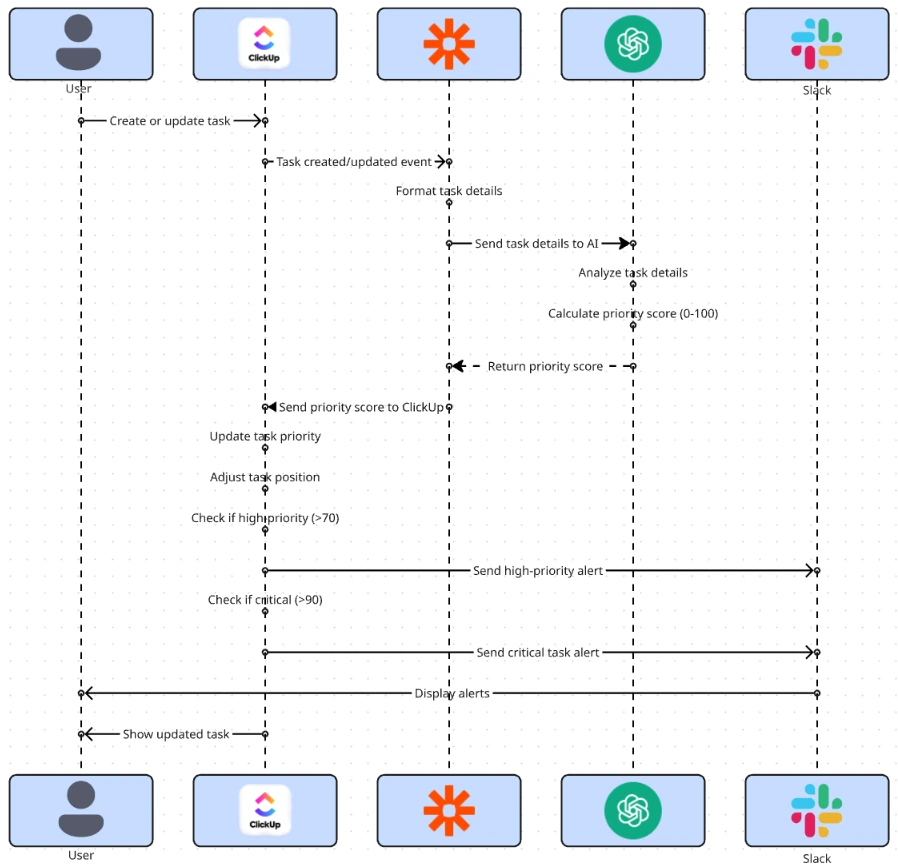
Fig. 1: System Architecture for AI-Based Task Scoring and Priority Alerts
6. Implementation Details
6.1 AI Prompt (The Core Logic)
The following prompt powered the scoring system:
					“Based on the following task details, assign a priority score (0–100).
Consider urgency, proximity to deadlines, task complexity, business impact, workload, and dependencies.
Output a single number only:

Task Title: {{title}}
Task Description: {{description}}
Due in: {{days_left}} days
Dependencies: {{dependency_count}}
Workload of Assignee: {{assignee_current_hours}} hours
Complexity: {{complexity_tag}}
Impact Tag: {{impact}}

Score meaning:
0–30 = Low
31–60 = Medium
61–100 = High"
The AI returns a single numeric score.
6.2 Score Mapping
| Score Range | Priority | Behavior |
|---|---|---|
| 0–30 | Low | Moved to Backlog / Later |
| 31–60 | Medium | Stays in the normal workflow |
| 61–80 | High | Moved to High Focus |
| 81–100 | Critical | PM alerted; added to urgent lane |
6.3 ClickUp Automations
Rules used inside ClickUp:
					If Priority = High → Move to "High Focus"
If Priority = Critical → Add to "Urgent Queue" + Tag PM
If Priority drops from High → Notify Team Lead
If Priority increases → Ping assignee
6.4 Data Extracted for AI Scoring
The system evaluated:
- ◉ Task name & description
- ◉ Deadline proximity
- ◉ Assignee workload hours
- ◉ Number of blockers or dependencies
- ◉ Time estimate/complexity
- ◉ Impact on the project or the client
This ensured the model scored tasks holistically and accurately.
7. Code-to-Business Breakdown
| Logic / Code | Business Impact |
|---|---|
| AI scoring (0–100) | Consistent and objective prioritization |
| Due-date weighting | Prevents last-minute bottlenecks |
| Workload checking | Balances workload across team members |
| Impact scoring | Ensures high-impact tasks rise automatically |
| Dependency detection | Surfaces blocked tasks early |
| Slack alerts | Improves response time to urgent tasks |
| Auto-moving tasks | Removes PM’s repetitive sorting work |
8. Real-World Brand Scenario
8.1 About OnDeemand (Operating Environment)
OnDeemand is a performance-focused digital marketing agency operating across paid media, creative production, content, and growth execution. The agency manages ongoing client engagements rather than one-off projects, with multiple active accounts running in parallel.
The operating model emphasizes:
◉ Continuous campaign optimization
◉ Fast turnaround on creative and ad iterations
◉ Shared internal resources across multiple clients
◉ High responsiveness to performance data and client feedback
This structure creates an environment where priorities shift frequently and execution speed directly impacts client outcomes.
8.2 How OnDeemand Operated Before the Workflow
Before AI-driven prioritization, task management relied on ClickUp boards supported by real-time communication tools.
Operational patterns included:
◉ Tasks created and updated manually inside ClickUp
◉ Urgency communicated through Slack rather than reflected in task priority
◉ Project managers repeatedly reviewing and reordering tasks
◉ Priority decisions influenced by recent messages instead of system-wide logic
While workable at lower volumes, this approach became difficult to maintain as task count and client complexity increased.
8.3 Why the Need Became Critical
As OnDeemand scaled its execution volume, several pressure points emerged:
◉ Task urgency changed faster than manual boards could be updated
◉ High-impact client work competed with low-impact internal tasks
◉ Dependencies between creative, ads, and reporting surfaced late
At this stage, prioritization became an operational risk rather than a planning challenge, requiring a system-level solution.
8.4 How the Workflow Was Implemented in Practice
The AI-driven prioritization workflow was introduced as an operational layer, not a process overhaul.
Key decisions included:
◉ Keeping ClickUp as the single source of truth
◉ Allowing priority to update dynamically
◉ Limiting notifications to high-risk scenarios
◉ Ensuring the system reflected real agency behavior
Teams continued working inside familiar tools while priority calculation ran in the background.
8.5 Adoption Inside the Team
◉ Execution teams relied on ClickUp priority instead of Slack signals
◉ Task boards required minimal manual maintenance
◉ Project managers focused on delivery risks rather than task sorting
◉ Priority discussions shifted from subjective urgency to system output
The workflow became part of daily execution rather than an external automation layer.
8.6 Live Execution Inside OnDeemand
The workflow operated within day-to-day delivery, where multiple client engagements ran concurrently under shared resource constraints.
Client work involved a mix of retainers and performance-based engagements requiring continuous execution. Common conditions included:
◉ Time-sensitive paid media optimizations driven by live performance data
◉ Creative deliverables tied to campaign launches and testing cycles
◉ Client feedback loops that altered task urgency mid-week
In this environment, routine requests could escalate quickly, while lower-impact internal work continued to compete for attention if not actively deprioritized.
8.7 How the System Changed Execution
After deployment:
◉ Priority scores updated automatically as deadlines, workload, or dependencies changed
◉ High-impact tasks surfaced early without manual escalation
◉ ClickUp became the single source of truth for execution
◉ Slack interruptions decreased as urgency was already reflected in the workflow
Teams focused more on execution and less on negotiating priorities.
9. Results Observed
Time Efficiency
◉ Manual prioritization reduced by 6–8 hours per week
◉ Less time spent determining task order
Delivery Performance
◉ Missed deadlines reduced by approximately 42%
◉ High-impact tasks completed around 30% faster
◉ Blocked tasks surfaced earlier
Operational Clarity
◉ Clear, system-defined execution order
◉ Reduced reliance on Slack escalations
◉ Shorter, more focused daily standups
10. Challenges & How They Were Solved
During live usage:
Challenge: Too many AI triggers
Solution: Added filters to only re-score on meaningful updates
Challenge: Vague task descriptions
Solution: Implemented a description template and minimum required fields
Challenge: Score volatility
Solution: Used weighted logic and smoothing for more stable outputs
These refinements stabilized the system without reducing responsiveness.
11. Lessons for Project Managers
◉ Automation drastically reduces repetitive PM work
◉ AI removes emotional bias and enforces objective prioritization
◉ PMs can scale their management capacity by designing systems rather than micromanaging workflows
◉ Continuous re-evaluation ensures priorities stay accurate even as situations change
◉ Well-designed automation compounds in value over time
12. Conclusion
This case study demonstrates how an AI-driven task prioritization workflow can be implemented inside ClickUp and validated within a real marketing agency environment.
By shifting prioritization from manual judgment to system-based scoring, the workflow improved delivery speed, reduced project management overhead, and introduced consistent execution logic—without increasing operational complexity.
Looking to Build an Automated Prioritization System That Saves 300+ Hours a Year?