

1. Overview
Client communication is one of the most time-consuming responsibilities for project managers and account teams. With dozens of email threads, Slack conversations, and platform notifications occurring daily, keeping everyone aligned required constant manual filtering, summarizing, and forwarding of key client updates.
To solve this, I built an AI-powered communication summarization system that automatically scans incoming client messages, extracts the most important information, and compiles clean, structured summaries delivered directly into Slack.
The automation eliminated daily inbox overload, removed manual summary-writing, and created a reliable communication pipeline that kept teams aligned without needing PM intervention.
2. Background & Context
The agency managed communication across:
◉ Email threads from multiple client accounts
◉ Slack channels and DMs
◉ Comments within ClickUp tasks
◉ Occasional messages inside Meta Ads, Google Ads, and reporting portals
A typical day involved 40–60 new messages across clients, most of which required:
◉ Filtering for relevance
◉ Extracting requests or blockers
◉ Summarizing updates
◉ Tagging the right team members
◉ Logging action points
This process consumed 1.5–2 hours daily for the PM team and often led to missed updates, inconsistent communication, and slower response times.
3. Problem Statement
The operation suffered from:
1. No standardized system for summarizing client messages
2. Manual summaries required 10–12 hours per week
3. High risk of overlooked requests or important updates
4. Slow response times due to inbox overload
5. Lack of centralized visibility for the whole team
The team needed a system that could automatically process communication, extract key insights, and deliver unified, actionable summaries.
4. Tools & Automation Stack
5. Automation Flow
The system followed this structure:
This created a consistent, automated communication pipeline across all accounts.
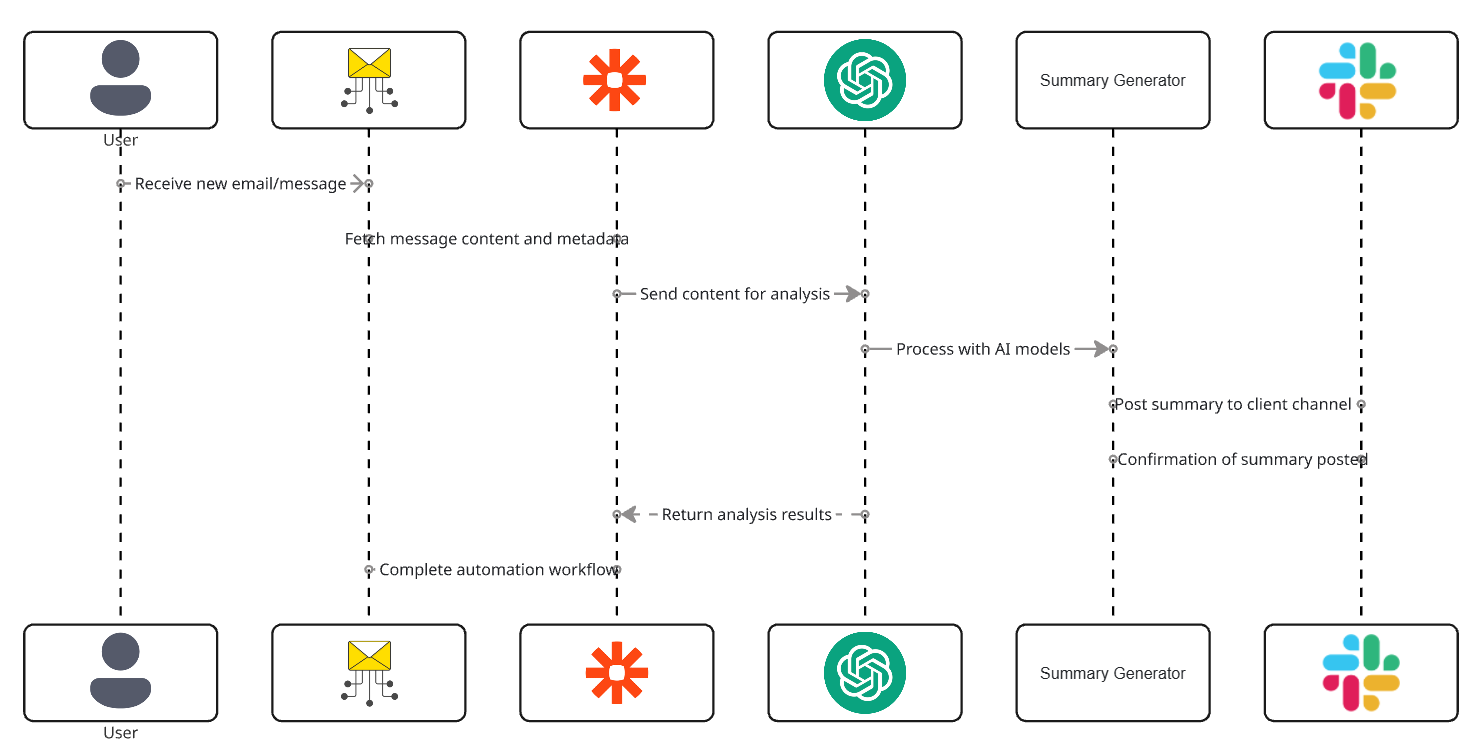
Fig. 1: System Architecture for AI-Based Message Analysis and Summary Distribution
6. Implementation Details
6.1 AI Prompt (The Core Logic)
The following prompt powered the summarization engine:
					“Analyze the following client communication and produce a structured summary.
Identify: key updates, requests, blockers, deadlines, approvals, action items, and risks.
Write in clear bullet points. Do NOT rewrite the entire message.

Client Message: {{message_body}}
Sender: {{sender}}
Date: {{date_received}}
Output:
– Summary of Update:
– Requests or Required Actions:
– Deadlines Mentioned:
– Dependencies / Blockers:
– PM/Team Follow-Up Needed:
The AI outputs a concise, structured summary.
6.2 Summary Classification Logic
The system categorized each AI output:
| Category | Meaning | System Behavior |
|---|---|---|
| General Update | Informational only | Posted in Slack |
| Request | Requires internal action | Creates ClickUp task |
| Urgent Request | Blocking or time-sensitive | Triggers immediate Slack alert |
| Approval | Client confirmation | Marks relevant task approved |
6.3 Automation Rules
Rules created in Zapier :
					If Email Received → Send content to AI
If Summary contains “action required” → Create a ClickUp task
If Summary contains “urgent” → Post alert in Slack
If the Message is informational → Post summary to daily digest
If the Message includes an attachment → Add to summary references
6.4 Data Extracted for AI Summaries
These rules ensured every message triggered the correct workflow outcome.
7. Code-to-Business Breakdown
| Logic / Code | Business Impact |
|---|---|
| AI summarization | Removes manual reading, filtering, and rewriting |
| Urgency detection | Ensures no client emergency is overlooked |
| Keyword extraction | Identifies actionable items instantly |
| Slack message posting | Improves visibility and team alignment |
| Automated task creation | Eliminates missed follow-ups |
| Daily digest creation | Reduces noise while preserving relevance |
8. Results & Performance Impact
1. Time Saved
2. Communication Reliability Improved
3. Team Alignment
4. Scalability
The system worked across all clients without additional configuration.
Each client’s messages were summarized and delivered to their corresponding Slack channel automatically.
9. Challenges & How They Were Solved
10. Lessons for Project Managers
11. Conclusion
By integrating AI-powered summarization with Slack delivery, the agency transformed its communication process from reactive and chaotic to proactive and organized.
The system analyzed every incoming client message, extracted key updates and action items, and delivered clean summaries directly to the team.
This automation eliminated inbox stress, improved response times, reduced missed requests, and helped the PM operate at scale—turning communication management from a daily burden into a fully automated workflow.
Looking to Eliminate Inbox Overload by Automating Client Message Summaries?