

1. Overview
Weekly performance reporting is one of the most repetitive and time-consuming tasks for project managers. Generating reports from multiple platforms—ads dashboards, CRM systems, email metrics, creative outputs, deliverables, and task statuses—requires careful consolidation and manual formatting before sharing updates with clients and internal teams. This process often consumes hours every week, leaving PMs with less time for strategy and oversight.
To solve this, I built an AI-powered reporting engine that automatically collects weekly data, analyzes performance trends, formats insights, and delivers a complete, client-ready report. The system eliminates manual report creation entirely, produces consistent outputs, and gives PMs the ability to scale their workload without sacrificing quality or visibility.
2. Background & Context
The agency managed multi-channel reporting across:
◉ Meta and Google Ads
◉ Email marketing platforms
◉ Website analytics
◉ Creative pipelines
◉ Content calendars
◉ ClickUp production timelines
Before automation, weekly reporting required the project manager to:
◉ Log into multiple platforms
◉ Pull metrics manually
◉ Identify wins and gaps
◉ Summarize performance
◉ Write narrative insights
◉ Create next-week action items
◉ Format the report consistently
This consumed 3–5 hours per client each week, adding up to more than 15 hours weekly across all accounts.
3. Problem Statement
1. Weekly reporting was slow and highly manual
2. Reports varied in clarity depending on who prepared them
3. PM workload limits restricted client capacity
4. Insights were sometimes incomplete due to rushed analysis
5. No standardized narrative or recommendation format
6. Significant time lost switching between platforms
The team needed a fast, consistent, automated reporting framework that produced high-quality weekly reports without manual effort.
4. Tools & Automation Stack
◉ Google Ads / Meta Ads API (performance data)
◉ Email platforms (Klaviyo / Mailchimp / HubSpot)
◉ Google Analytics / GA4 (web insights)
◉ OpenAI API (analysis, narrative writing, insight generation)
◉ Zapier / Make.com (workflow automation)
◉ Slack (report delivery and alerts)
◉ ClickUp (task logging and follow-up creation)
5. Automation Flow
The system followed this structure:
1. Weekly trigger initiates the reporting workflow
2. Data is extracted from marketing, analytics, and project platforms
3. AI analyzes the raw data, identifies patterns, and generates insights
4. AI formats a structured weekly performance report
5. Slack delivers the completed report to the team or client
6. ClickUp automatically creates next-week action items based on the insights
This created a fully automated reporting pipeline that operated with zero manual touch.
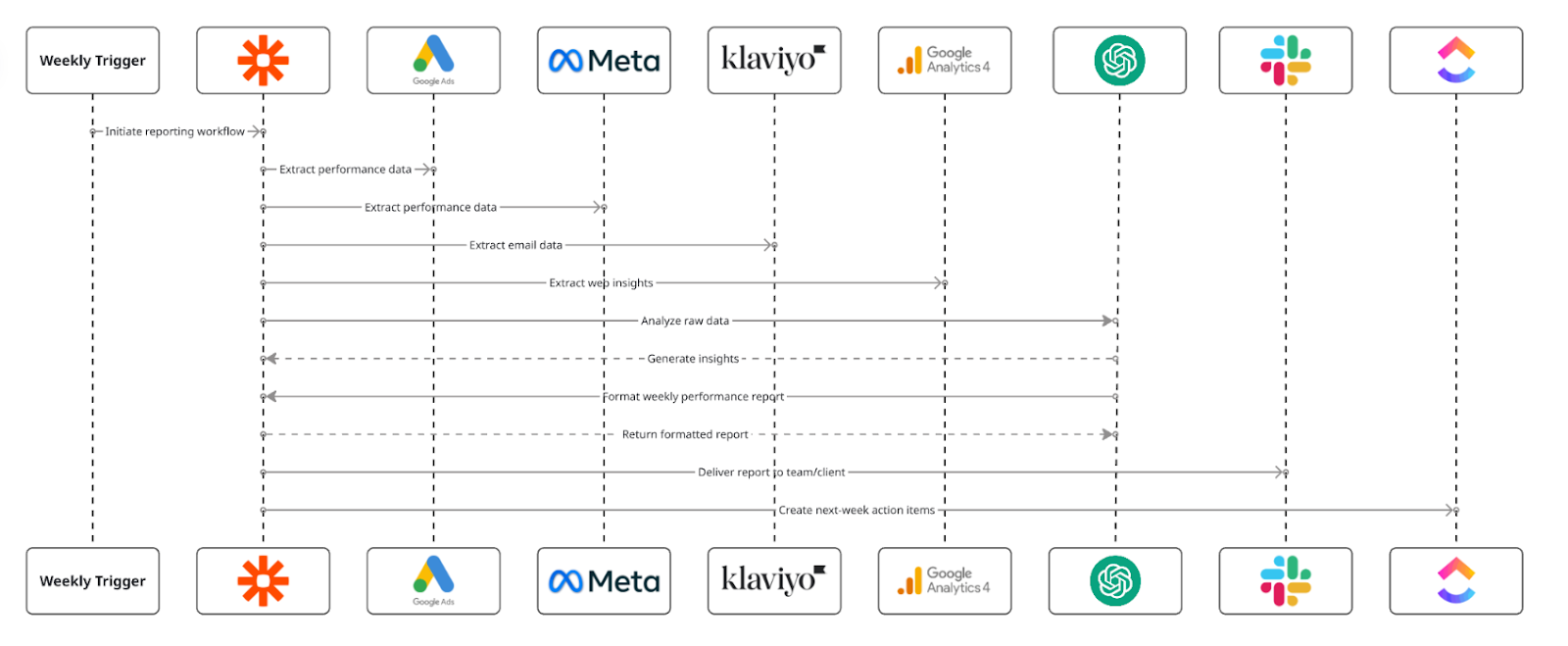
Fig. 1: End-to-End Weekly Performance Reporting Automation for Project Managers
6. Implementation Details
6.1 AI Prompt (The Core Logic)
The AI summarization and analysis engine used the following structured prompt:
					“Analyze the following weekly performance data and generate a complete report.
Identify: wins, losses, trends, efficiency metrics, anomalies, and opportunities.
Provide a narrative summary plus a list of recommendations and next steps.

Data: {{weekly_data}}

Output Requirements:
- Performance Summary
- Channel-by-Channel Insights
- KPI Changes (Week-over-Week)
- Notable Improvements or Declines
- Risks or Red Flags
- Recommended Actions for Next Week
- Items That Need Team or Client Attention
Use clear, concise language suitable for weekly reporting.”
The AI returns a fully formatted report.
6.2 Score Mapping (Interpretation Rules)
Instead of task scoring, the system used performance-level classification:
| Category | Meaning | Behavior |
|---|---|---|
| Strong Performance | KPIs exceed goals | Highlight wins and expand strategy |
| Neutral Performance | KPIs stable | Recommend optimizations |
| Weak Performance | KPIs drop | Flag issues and create follow-up tasks |
| Critical Issues | Major drops or system errors | Immediate Slack alert and PM review |
6.2 Score Mapping (Interpretation Rules)
ClickUp automations handled follow-up actions:
					If AI flags “Critical Issues” → Create urgent ClickUp task for PM
If report contains “Next Steps” → Auto-create tasks in roadmap
If KPIs decline → Add task to review campaign strategy
If opportunities listed → Assign tasks to channel owners
If weekly report posted → PM notified for final review
This ensured data-driven execution directly from the report.
6.4 Data Extracted for AI Reporting
The system pulled:
◉ Ad spend, CPC, CPM, CTR, ROAS
◉ Conversion volume and cost
◉ Email revenue, open rates, click rates, AOV
◉ Website traffic, session sources, engagement metrics
◉ Creative outputs completed in ClickUp
◉ Task completion velocity
◉ Lead quality indicators
This gave AI a complete view of weekly performance.
7. Code-to-Business Breakdown
| Logic / Code | Business Impact |
|---|---|
| Automated data extraction | Removes manual platform switching |
| AI analysis | Produces consistent, objective reporting |
| KPI interpretation | Identifies trends PMs may overlook |
| Narrative generation | Creates client-ready reports instantly |
| Follow-up task automation | Ensures insights convert to execution |
| Slack delivery | Centralizes visibility for team and client |
8. Real-World Brand Scenario: Deployment Inside OnDeemand
About OnDeemand (Operating Environment)
OnDeemand operates as a performance-focused marketing agency managing multiple client accounts across paid media, email marketing, analytics, creative delivery, and ongoing optimization workflows. The agency runs continuous execution rather than isolated campaigns, with project managers overseeing performance, delivery, and communication across several clients in parallel.
Weekly reporting plays a critical role inside this environment. Reports are used not only for client communication, but also for internal alignment, prioritization, and decision-making across accounts.
How Weekly Reporting Worked Before Automation
Before the AI reporting engine was implemented, weekly reporting inside OnDeemand followed a fully manual process.
Project managers were responsible for:
◉ Logging into multiple ad, analytics, and email platforms
◉ Pulling metrics manually for each client
◉ Interpreting week-over-week performance
◉ Writing narrative summaries and insights
◉ Identifying risks and opportunities
◉ Creating follow-up tasks for the next week
◉ Formatting reports consistently for delivery
This process typically required 3–5 hours per client per week, making reporting one of the largest recurring time drains in PM operations.
As the number of active clients increased, this workload began to limit scalability.
Why the Need Became Critical
As OnDeemand scaled client volume and channel complexity, several operational issues emerged:
◉ PM capacity was capped by reporting workload rather than strategic oversight
◉ Reports varied in depth and quality depending on time constraints
◉ Insights were sometimes rushed or incomplete
◉ Follow-up actions were delayed due to manual task creation
◉ Time spent switching between platforms increased week over week
At this stage, reporting was no longer just repetitive—it became a structural bottleneck that constrained how many clients a PM could effectively manage.
How the Reporting Engine Was Implemented in Practice
The AI-powered reporting engine was introduced as an operational automation layer, not as a replacement for PM judgment.
Key implementation principles included:
◉ Fully automating data collection across all platforms
◉ Using AI to interpret performance consistently every week
◉ Generating standardized, client-ready reports automatically
◉ Converting insights directly into ClickUp follow-up tasks
◉ Delivering reports on a fixed weekly schedule without manual triggers
Project managers continued reviewing and acting on insights, while the system handled the entire preparation and formatting process in the background.
How Execution Changed After Adoption
Once deployed across live client accounts:
◉ Weekly reports were generated automatically in minutes
◉ PMs no longer manually collected or formatted data
◉ Insights became more consistent and comprehensive
◉ Follow-up actions were created automatically in ClickUp
◉ Reports were delivered on time every week without delays
Reporting shifted from a manual administrative task to a reliable, system-driven process that supported faster decision-making.
9. Results & Performance Impact
Time Saved
◉ 3–5 hours saved per client per week
◉ Over 15+ hours saved weekly across all active accounts
◉ PMs regained significant time for strategy and oversight
Reporting Quality Improved
◉ Reports followed a standardized structure every week
◉ Insights were more objective and data-driven
◉ Reduced human bias and oversight errors
Faster Alignment
◉ Teams received reports at the same time each week
◉ No delays caused by manual preparation
◉ Decisions and optimizations happened earlier in the cycle
Scalability
◉ A single PM could manage reporting for 10–15 clients without added workload
◉ Reporting capacity scaled without hiring additional resources
10. Challenges & Adjustments During Live Use
Several refinements were made after observing real operational behavior:
◉ Incomplete or delayed API data → Added fallback data sources and error-handling logic
◉ Lack of account-specific context in AI insights → Included historical performance data and account metadata in prompts
◉ Overloaded recommendation lists → Introduced prioritization logic to surface the top three actions only
These adjustments improved clarity and actionability without increasing complexity.
11. Key Learnings
◉ Reporting is one of the highest-impact workflows to automate in agency operations
◉ AI delivers more consistent insights than manual interpretation under time pressure
◉ Standardized reporting improves both internal and client communication
◉ Automating routine PM work significantly increases operational capacity
12. Conclusion
This case study demonstrates how an AI-powered reporting engine can be implemented inside a marketing agency like OnDeemand to eliminate manual weekly reporting entirely.
By automating data collection, analysis, narrative generation, and follow-up task creation, the system reduced PM workload by more than 15 hours per week, improved report quality, and enabled the agency to scale client operations without increasing overhead.
Looking to Automate Your Entire Quarterly Planning Process With One Click?