

1. Overview
Lead generation funnels often rely on multiple moving parts—forms, landing pages, ad platforms, CRMs, and integration tools. When even one link in this chain breaks, leads fail to enter the CRM, causing lost opportunities, wasted ad spend, and client frustration. Detecting these breakdowns manually is tedious, reactive, and unreliable.
To solve this, I built an automated lead flow monitoring system that continuously checks whether leads from ads and form submissions are successfully reaching the CRM. When a drop, delay, or data mismatch is detected, the system sends the project manager an instant alert with a diagnosis and recommended fix. This transformed funnel supervision into a proactive, automated safety net that prevents lead loss and protects client revenue.
2. Background & Context
The agency managed multiple client funnels across:
◉ Meta Ads lead forms
◉ Google Ads lead-gen landing pages
◉ Website contact forms
◉ Third-party landing page tools (Unbounce, Webflow, Typeform)
◉ CRM systems such as HubSpot, GoHighLevel, Pipedrive, and Salesforce
Before automation, the PM had to manually check:
◉ Whether form submissions were entering the CRM
◉ Whether ad platform leads synced properly
◉ If Zapier/Make connections were failing
◉ If CRM fields were mismatched
◉ If duplicate prevention rules were blocking leads
◉ If delays in API sync were affecting reporting
Breakdowns often went unnoticed until clients complained, by which time dozens—or even hundreds—of leads could be lost.
3. Problem Statement
The team faced several operational issues:
1. Lead delivery breakdowns were often discovered too late
2. Manual monitoring consumed hours weekly
3. There was no real-time alerting mechanism
4. Inconsistent funnel structures made debugging slow
5. Lost leads created distrust and strained PM–client relationships
6. Missing data resulted in inaccurate reporting and poor optimization decisions
The team needed an automated monitoring solution that validated funnel health continuously and alerted the PM the moment something broke.
4. Tools & Automation Stack
◉ Meta Ads / Google Ads API (lead data source)
◉ Website form APIs (Webflow, WordPress, Unbounce, Typeform)
◉ CRM API (HubSpot / GoHighLevel / Salesforce)
◉ Zapier / Make.com (integration and comparison automations)
◉ OpenAI API (alert interpretation and fix instructions)
◉ Slack (real-time alert delivery)
◉ ClickUp (follow-up tasks upon severe breakdowns)
5. Automation Flow
The system followed this structure:
1. Hourly trigger initiates lead flow check
2. Automation pulls lead counts from forms/ad platforms
3. Automation pulls corresponding lead counts from CRM
4. AI evaluates discrepancies and classifies them
5. Slack alerts PM if a mismatch, delay, or failure is detected
6. ClickUp creates corrective tasks for critical breakdowns
7. PM resolves issue using recommended fix steps
This created a full early-warning system for funnel health.
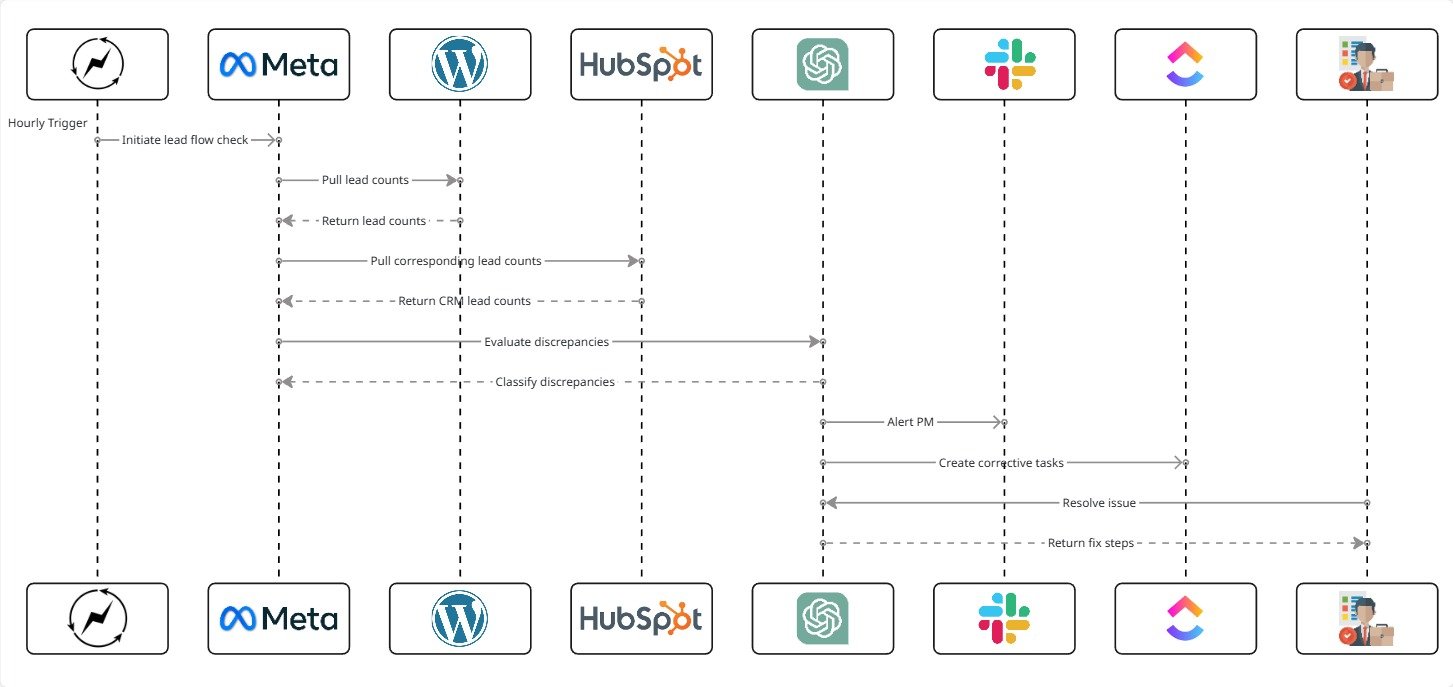
Fig. 1: Proactive AI-Powered Lead Flow Monitoring and Early-Warning System
6. Implementation Details
6.1 AI Prompt (The Core Logic)
The AI model used the following prompt to diagnose funnel issues:
					“Compare lead data from source platforms (ads/forms) with CRM data.
Identify whether leads are syncing correctly. If discrepancies exist, classify
the severity and provide potential reasons and recommended fixes.

Data: {{lead_flow_metrics}}

Output Requirements:
- Status: Healthy / Delay / Partial Failure / Full Failure
- Lead discrepancy count
- Possible cause(s)
- Recommended immediate fix
- Whether PM action is required”
The AI returns a structured diagnostic summary.
6.2 Score Mapping (Interpretation Rules)
The system mapped AI-detected issues into actionable categories:
| Status | Meaning | Behavior |
|---|---|---|
| Healthy | No discrepancy | No action needed |
| Delay | Minor lag in syncing | Notify PM for review |
| Partial Failure | Some leads missing | Send Slack alert with instructions |
| Full Failure | Zero leads entering CRM | Critical alert + ClickUp task |
This ensured alerts were meaningful and aligned with severity.
6.3 ClickUp Automations
ClickUp handled follow-up workflows with rules like:
					If Status = Full Failure → Create urgent ClickUp task
If Status = Partial Failure → Assign diagnostic checklist to PM
If Status = Delay → Add reminder task after 2 hours
If issue resolved → Auto-close related ClickUp tasks
If recurring failures → Escalate to senior strategist
These automations standardized funnel maintenance and accountability.
6.4 Data Extracted for AI Analysis
The system evaluated:
◉ Lead counts per hour from Meta Ads
◉ Lead counts per hour from Google Ads form extensions
◉ Form submission logs
◉ CRM new-contact logs
◉ Zapier/Make run history
◉ CRM error messages (duplicate blocking, field mismatches)
◉ Time-delay between form and CRM entry
◉ Drop-off patterns across time intervals
This provided enough context for precise issue detection.
7. Code-to-Business Breakdown
| Logic / Code | Business Impact |
|---|---|
| Lead-source vs CRM comparison | Prevents lost leads before clients notice |
| Discrepancy scoring | Ensures proper severity classification |
| Automation triggers | Replaces manual funnel monitoring |
| Slack alerts | Provides instant visibility of funnel failures |
| Root-cause diagnoses | Speeds up PM troubleshooting |
| Auto task creation | Ensures follow-through on critical issues |
8. Real-World Brand Scenario: Deployment for Care Plus Advantages
About Care Plus Advantages (Operating Environment)
Care Plus Advantages operates as a healthcare-focused organization running lead-generation funnels across paid media and web-based forms. Lead flow consistency is critical, as inbound leads directly drive consultations, follow-ups, and enrollment workflows.
The lead-generation environment involved:
◉ Meta Ads and Google Ads lead sources
◉ Website and third-party form submissions
◉ CRM-based intake and follow-up workflows
◉ Integration layers connecting ads, forms, and CRM systems
Because leads entered the system continuously throughout the day, even short disruptions in lead flow posed a risk to revenue, reporting accuracy, and operational trust.
How Lead Flow Was Monitored Before the System
Before the proactive monitoring system was introduced, lead flow verification relied on manual checks.
This typically involved:
◉ Periodic spot checks of CRM new-contact counts
◉ Manual comparison against ad platform lead volume
◉ Investigating Zapier or Make scenarios only after issues were suspected
◉ Discovering breakdowns through delayed client or internal feedback
This approach was reactive by nature. Lead delivery issues were often detected hours—or days—after they occurred.
Why the Need Became Critical
As Care Plus Advantages increased lead volume and funnel complexity:
◉ Short integration failures could silently block dozens of leads
◉ Manual checks failed to catch issues during off-hours
◉ Reporting discrepancies created confusion and delayed optimization
◉ Trust in funnel reliability decreased when issues surfaced late
At this stage, lead monitoring was no longer an operational convenience—it became a revenue-protection requirement.
How the Proactive Monitoring System Was Implemented in Practice
The AI-driven lead flow monitoring system was introduced as an always-on validation and alerting layer, not as a reporting tool.
Key implementation principles included:
◉ Hourly automated comparison between lead sources and CRM intake
◉ AI-based classification of discrepancies by severity
◉ Immediate Slack alerts when abnormal patterns were detected
◉ Clear diagnostic context included with every alert
◉ Automatic ClickUp task creation for critical failures
The system continuously validated funnel health in the background, requiring no manual intervention during normal operation.
How Execution Changed After Adoption
Once deployed for Care Plus Advantages:
◉ Lead delivery issues were detected within minutes
◉ PMs received clear alerts before clients noticed problems
◉ Integration failures were resolved faster with guided diagnostics
◉ Manual funnel checks were no longer required
◉ CRM data accuracy improved across reporting and optimization
Lead flow supervision shifted from reactive troubleshooting to proactive system-driven monitoring.
9. Results Observed for Care Plus Advantages
Time Efficiency
◉ 3–4 hours per week saved from manual funnel checks
◉ Reduced PM workload related to reactive debugging
Lead Loss Prevention
◉ Lead gaps identified early instead of after client escalation
◉ Prevented silent loss of leads during integration failures
Funnel Stability
◉ Early detection of recurring sync and delay issues
◉ Improved consistency between ad platforms and CRM data
Scalability
◉ Monitoring applied across all active funnels
◉ New funnels entered the system with minimal configuration
◉ Increased lead volume without increased monitoring overhead
10. Challenges & Adjustments During Live Use
Several refinements were made after observing real funnel behavior:
Temporary API delays triggering false alerts
◉ Added tolerance windows and smoothing logic
CRM duplicate rules blocking valid leads
◉ Introduced duplicate-detection flagging and diagnostics
Inconsistent naming across forms and CRMs
◉ Standardized identifiers for reliable comparison
These adjustments improved alert accuracy while preserving fast detection.
11. Key Learnings
◉ Lead flow reliability is critical to revenue and trust
◉ Manual funnel monitoring does not scale reliably
◉ AI-based diagnostics accelerate issue resolution
◉ Early alerts prevent downstream reporting and optimization errors
◉ Proactive systems outperform reactive checks in complex funnels
12. Conclusion
This case study demonstrates how a proactive lead flow monitoring system using AI can be implemented for a healthcare organization like Care Plus Advantages to safeguard lead-generation operations.
By continuously validating lead delivery across ads, forms, and CRM systems—and delivering real-time Slack alerts with actionable diagnostics—the system eliminated blind spots, prevented lead loss, and transformed funnel oversight into a reliable, automated safety layer without adding operational complexity.
Want to Catch Lead Flow Issues Instantly Before They Cost You Money?