


In today’s fast-paced business environment, the difference between growth and stagnation often comes down to how effectively time and effort are managed. Many teams work long hours, yet a large portion of that time is consumed by repetitive, low-value tasks.
This is where automation makes a measurable difference.
By automating the right everyday business tasks, teams can reclaim hours each week and redirect that time toward strategy, creativity, and customer impact. Automation is no longer reserved for large enterprises—it’s now accessible, affordable, and practical for small and mid-sized businesses.
At THRayvee, we focus on building smart workflows that remove friction from daily operations. Below are 10 everyday business tasks you can automate right now to realistically save 10+ hours per week—without adding complexity.
Why Automate Everyday Business Tasks?
Before diving into the list, it’s important to understand why automation delivers such strong returns.
Business process automation isn’t about replacing people—it’s about removing repetition. When routine tasks are handled by systems, businesses benefit from:
Increased productivity through faster execution
Higher accuracy and consistency with fewer human errors
More time for high-value work like planning and decision-making
Better scalability without proportional increases in workload
This aligns with how business process automation is used to improve efficiency across modern organizations.
In short: automate the mundane so people can focus on what actually drives growth.
1. Email Follow-Ups and Lead Nurturing
Sales and customer-facing teams spend a surprising amount of time sending follow-ups, reminders, and check-in emails.
Automation allows you to:
Trigger follow-ups based on user actions
Schedule nurture sequences automatically
Log interactions directly into your CRM
Notify internal teams when leads go cold
This keeps conversations moving without constant manual effort and reduces missed opportunities.
2. Social Media and Content Scheduling
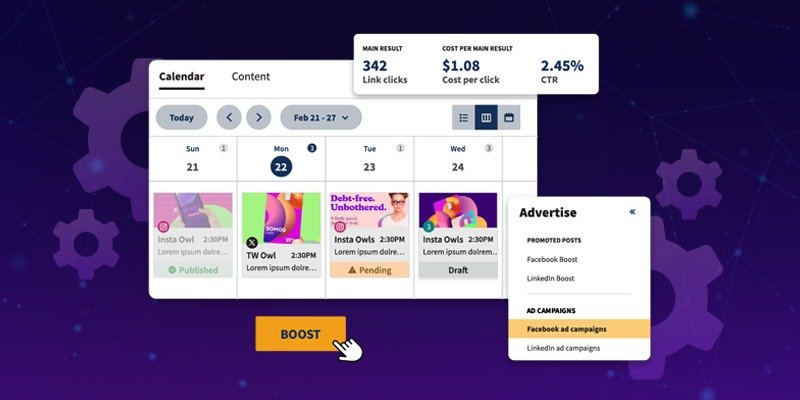
Posting content manually is distracting and inconsistent. Automation allows teams to batch work and stay visible without daily interruptions.
You can automate:
Content scheduling across platforms
Optimal posting times
Re-sharing evergreen content
Distribution of blog links and updates
Social scheduling is widely recognized as a high-impact automation opportunity for small teams.
3. Generating and Distributing Reports
Reports often require repetitive data collection, formatting, and sharing. This is one of the most time-intensive manual processes in many businesses.
Automation enables you to:
Pull data from multiple systems automatically
Generate standardized reports or dashboards
Send reports to stakeholders on a fixed schedule
Automated reporting improves visibility while eliminating manual overhead.
4. Invoice Processing and Expense Approvals
Finance workflows are highly repetitive and rule-based—making them ideal for automation.
You can automate:
Invoice data extraction
Approval routing based on rules
Payment reminders and status updates
Ledger or accounting system updates
This reduces processing time and minimizes costly errors.
5. Employee Onboarding and Offboarding
Onboarding new hires involves many repeatable steps: account creation, access provisioning, training assignments, and documentation.
Automation helps by:
Triggering onboarding workflows automatically
Creating accounts and assigning tools
Sending welcome resources and checklists
Revoking access during offboarding
HR automation improves both efficiency and employee experience.
6. Customer Support Ticket Routing
Customer service teams often spend unnecessary time sorting, assigning, and escalating tickets.
Automation allows:
Automatic ticket categorization
Smart assignment based on issue type
Pre-written responses for common questions
Escalation rules for unresolved cases
This improves response time and helps teams scale without adding headcount.
7. Review and Feedback Collection
Requesting reviews manually is inconsistent and often forgotten.
Automation can:
Trigger review requests after key events
Send reminders if no response is received
Aggregate feedback into a central dashboard
Consistent feedback collection strengthens social proof without additional effort.
8. Data Entry and CRM Updates
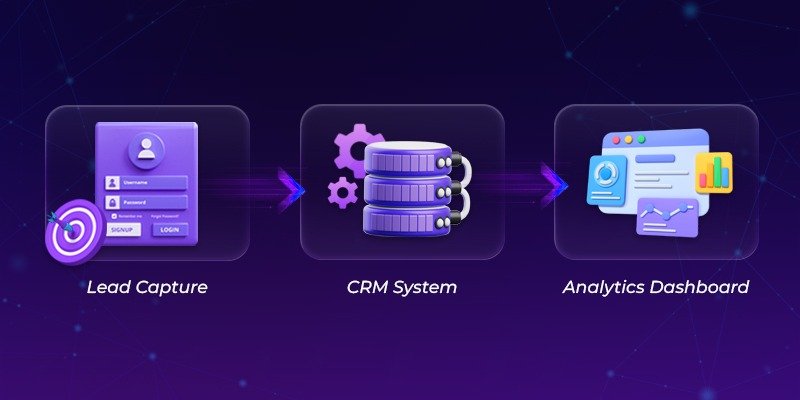
Manual data entry is slow, error-prone, and frustrating.
Automation enables:
Automatic lead capture from forms and ads
Data validation and de-duplication
Real-time CRM updates based on actions
Clean, accurate data improves reporting and sales performance.
9. Appointment Scheduling and Calendar Management
Back-and-forth emails to find meeting times waste hours every week.
Automated scheduling tools:
Show real-time availability
Send confirmations and reminders
Create calendar events automatically
Trigger follow-up workflows
Scheduling automation is one of the fastest ways to reclaim time.
10. Workflow Alerts and Task Reminders
Small reminders often prevent big problems.
You can automate alerts for:
Pending approvals
Contract renewals
Missed deadlines
Performance thresholds
These micro-automations prevent bottlenecks and reduce manual chasing.
This approach reflects how workflow automation improves consistency and execution speed.
How to Get Started With Automation
Knowing what to automate is only half the work. Execution matters.
Start small
Pick one repetitive task with clear steps.Map the current process
Document how the task works today before automating it.Choose practical tools
Many automations can be built with low-code or built-in workflows.Test and refine
Monitor time saved, errors reduced, and team adoption.Measure impact
Track hours saved and operational improvements.Train your team
Automation works best when people understand and trust the system.
Why Saving 10+ Hours a Week Matters
Saving 10 hours per week translates into:
One full workday reclaimed every week
Over 500 hours per year redirected to growth
Less burnout and fewer errors
More consistent operations
Research consistently shows that automation-driven organizations outperform peers in efficiency and scalability.
Final Thoughts
Automation isn’t about working harder—it’s about working smarter.
By automating everyday tasks like follow-ups, reporting, onboarding, scheduling, and reminders, businesses can save significant time, reduce errors, and scale operations without increasing effort.
Start with one task. Automate it well. Then build from there.
Your future self—and your team—will thank you.