

1. Overview
As lead volume increases, CRM data quality degrades rapidly. Duplicate contacts, missing fields, inconsistent formats, and incomplete records create operational friction across sales and marketing teams.
To solve this, I built a CRM Auto-Cleaner System that continuously monitors contact data, applies rule-based corrections, merges duplicates, and fills missing fields automatically.
Instead of relying on manual cleanup, the system ensures that CRM data remains accurate, structured, and usable at scale—without PM intervention.
2. Background & Context
The system was designed for environments with:
◉ High lead volume from multiple sources
◉ CRM-based sales pipelines
◉ Multi-channel lead capture (ads, forms, imports)
◉ Rapidly growing contact databases
Before automation, the CRM suffered from:
◉ Duplicate contacts across sources
◉ Missing key fields (name, source, location, lifecycle stage)
◉ Inconsistent formatting (phone, email casing, naming)
◉ Unreliable segmentation due to bad data
This impacted both reporting accuracy and sales execution.
3. Problem Statement
The CRM data structure faced several issues:
◉ 1. Duplicate contacts created fragmented lead histories
◉ 2. Missing fields blocked segmentation and automation
◉ 3. Inconsistent data formats reduced system reliability
◉ 4. Manual cleanup was time-consuming and often skipped
◉ 5. Sales teams worked with incomplete or incorrect information
The system needed to maintain data hygiene automatically and continuously.
4. Tools & Automation Stack
◉ CRM platform (HubSpot / GoHighLevel / Salesforce / similar)
◉ Data validation and rule engine
◉ Automation platform (Make.com / Zapier)
◉ Enrichment logic (internal mapping / external sources)
◉ Google Sheets / Database (log tracking and audits)
◉ Optional: AI layer for normalization and inference
This allowed both rule-based and conditional automation.
5. Automation Flow
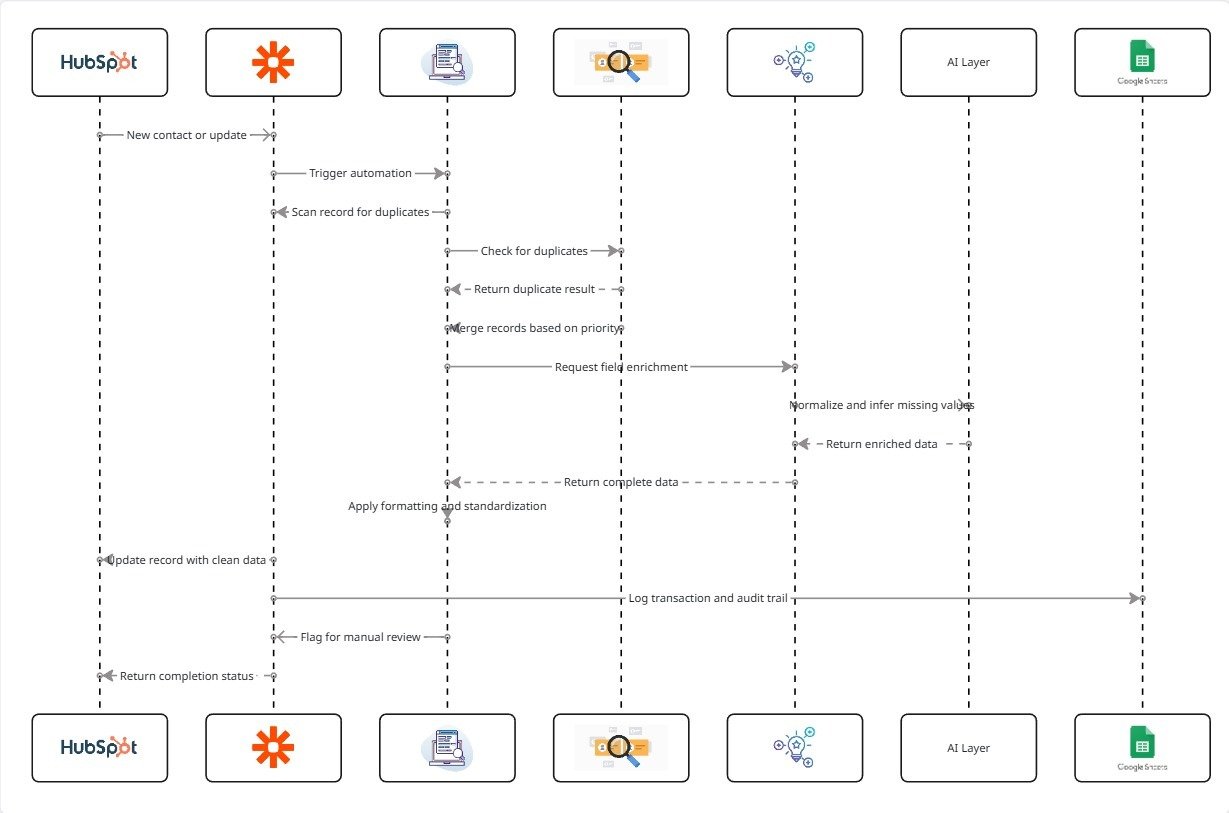
The CRM Auto-Cleaner followed this lifecycle:
◉ 1. New contact enters CRM or existing contact is updated
◉ 2. System scans record for duplicates and missing fields
◉ 3. Duplicate detection logic is applied
◉ 4. If duplicate found → records merged based on priority rules
◉ 5. Missing fields are enriched or inferred
◉ 6. Formatting rules standardize data
◉ 7. Record is updated and logged
◉ 8. Critical conflicts flagged (if needed)
This created a continuous data maintenance system.
6. Implementation Details
6.1 Duplicate Detection Logic
Duplicates were identified using:
◉ Email match (primary identifier)
◉ Phone number match
◉ Name + partial match logic
◉ Cross-source duplication signals
Example rules:
◉ Same email → Auto-merge
◉ Same phone → Merge with verification
◉ Similar name + same source → Flag for merge
6.2 Merge Rules & Priority Logic
When duplicates were found:
◉ Most recent record retained as primary
◉ Most complete record selected for field priority
◉ Activity history consolidated
◉ Tags merged and deduplicated
◉ Source attribution preserved
This ensured no data loss during merging.
6.3 Missing Field Enrichment
The system filled missing data using:
◉ Form submission data
◉ Previous interactions
◉ Source-based defaults
◉ Geo or campaign mapping
Example:
◉ Missing language → inferred from location
◉ Missing source → derived from campaign data
◉ Missing lifecycle stage → inferred from behavior
6.4 Data Standardization Rules
The system enforced consistency:
◉ Email lowercase normalization
◉ Phone number formatting
◉ Name capitalization rules
◉ Country and location standardization
This ensured clean segmentation and reporting.
6.5 AI Prompt (Optional Data Inference Layer)
					You are a CRM data quality assistant.

Given:
- Partial contact data
- Source information
- Behavioral context

Infer:
1) Missing fields (if confidently possible)
2) Correct formatting
3) Any inconsistencies

Only fill data if confidence is high.
Do not guess critical fields.
7. Score Mapping / Classification Logic
Contacts were classified as:
| Status | Meaning | Action |
|---|---|---|
| Clean | All fields valid and complete | No action |
| Incomplete | Missing non-critical fields | Enrich automatically |
| Duplicate | Multiple records detected | Merge |
| Conflict | Data inconsistency detected | Flag for review |
This created clear data quality visibility.
8. CRM Automations
The system implemented:
◉ Auto-merge workflows for duplicates
◉ Field enrichment triggers
◉ Data validation checkpoints
◉ Conflict alerts for manual review
◉ Scheduled cleanup audits
This ensured continuous maintenance without manual effort.
9. Code-to-Business Breakdown
| System Component | Business Impact |
|---|---|
| Duplicate detection | Prevents fragmented lead records |
| Merge automation | Consolidates contact history |
| Field enrichment | Improves segmentation accuracy |
| Data standardization | Ensures reporting consistency |
| Conflict flagging | Prevents incorrect automation triggers |
| Continuous cleanup | Maintains long-term CRM reliability |
10. Real-World Brand Scenario: Deployment for Secure Seniors Insurance
About Secure Seniors Insurance (Operating Environment)
Secure Seniors Insurance operates as an insurance-focused organization serving senior customers through consultation-driven sales processes. Lead generation occurs across multiple channels, including digital campaigns, inbound inquiries, and partner referrals. Given the nature of insurance sales, accurate CRM data is critical. Sales teams rely on complete and consistent contact records to manage follow-ups, segment audiences, and track customer journeys effectively.
As lead volume increases, maintaining data quality becomes essential to ensuring both operational efficiency and conversion performance.
How CRM Data Was Managed Before the System
Before the automated CRM cleaning system was implemented:
◉ Contacts were collected from multiple sources into the CRM
◉ Duplicate records were common across different entry points
◉ Key fields such as source, location, and lifecycle stage were often missing
◉ Data formats varied (phone numbers, names, email casing)
◉ Manual cleanup was performed inconsistently or delayed
As a result, CRM data became fragmented and difficult to rely on.
Why the Need Became Critical
As Secure Seniors Insurance scaled lead acquisition:
◉ Duplicate contacts created fragmented customer histories
◉ Missing data reduced segmentation and targeting accuracy
◉ Inconsistent formatting affected reporting and automation reliability
◉ Sales teams worked with incomplete or incorrect information
◉ Manual cleanup could not keep pace with database growth
At this stage, CRM data quality directly impacted both sales execution and marketing performance.
How the System Was Implemented in Practice
The CRM Auto-Cleaner system was introduced as a continuous data maintenance layer within the CRM.
Key implementation principles included:
◉ Detecting duplicates using multi-condition matching logic
◉ Automatically merging records based on priority rules
◉ Enriching missing fields using available data and mapping logic
◉ Standardizing formats across all contact records
◉ Flagging conflicts requiring manual review
◉ Running continuous and scheduled cleanup processes
The system operated in the background, ensuring that CRM data remained structured and reliable without manual intervention.
How Execution Changed After Adoption
Once deployed for Secure Seniors Insurance:
◉ Duplicate records were automatically merged and consolidated
◉ Missing fields were enriched consistently
◉ Data formatting became standardized across the CRM
◉ Sales teams accessed accurate and complete contact records
◉ Manual cleanup tasks were eliminated
CRM data shifted from a fragmented dataset to a reliable operational system supporting both sales and marketing workflows.
11. Results & Structural Impact
Improved Data Integrity
◉ Clean, structured, and consistent contact records
◉ Significant reduction in duplicate entries
Better Segmentation Accuracy
◉ More reliable campaign targeting
◉ Automation workflows triggered correctly
Reduced Manual Workload
◉ Eliminated need for periodic CRM cleanup
◉ Saved operational time for PMs and sales teams
Scalable CRM System
◉ Data quality maintained as lead volume increased
◉ CRM supported growth without degradation
12. Challenges & Adjustments
Improved Data Integrity
◉ Clean, structured, and consistent contact records
◉ Significant reduction in duplicate entries
Better Segmentation Accuracy
◉ More reliable campaign targeting
◉ Automation workflows triggered correctly
Reduced Manual Workload
◉ Eliminated need for periodic CRM cleanup
◉ Saved operational time for PMs and sales teams
Scalable CRM System
◉ Data quality maintained as lead volume increased
◉ CRM supported growth without degradation
13. Key Learnings
◉ CRM hygiene must be system-driven, not manual
◉ Duplicate data creates hidden inefficiencies across operations
◉ Data quality directly impacts segmentation and automation
◉ Clean data improves both reporting accuracy and sales execution
◉ Continuous automation is required to maintain long-term data integrity
14. Conclusion
This case study demonstrates how a CRM Auto-Cleaner system can be implemented for an insurance-focused organization like Secure Seniors Insurance to maintain data quality at scale.
By automating duplicate merging, field enrichment, and data standardization, the system transformed the CRM into a reliable, structured data layer—ensuring accurate segmentation, improved sales efficiency, and scalable operations without increasing manual workload.
Need to Maintain Clean, Structured CRM Data Automatically Without Manual Cleanup?