

1. Overview
Managing budget pacing in Google Ads is one of the most critical responsibilities for paid media teams. Overspending wastes budget prematurely, while underspending prevents campaigns from reaching their full potential and disrupts monthly pacing. Traditionally, media buyers manually monitored spend throughout the day, but this was inconsistent, reactive, and often too late to prevent budget deviations.
To solve this, I built a real-time budget pacing alert system that automatically checks spend levels against the monthly budget, forecasts pacing, and sends Slack alerts when campaigns risk overspending or underspending. The system eliminated manual pacing checks and provided proactive visibility into budget health across all Google Ads accounts.
2. Background & Context
The agency managed multiple Google Ads accounts across:
◉ E-commerce brands
◉ Service-based businesses
◉ Lead generation campaigns
◉ Multi-location businesses
Budget pacing previously required:
◉ Daily or hourly monitoring of campaign spend
◉ Comparing accumulated spend to expected pacing
◉ Forecasting end-of-month performance
◉ Identifying overspending or underspending patterns
◉ Manually warning PMs or media buyers
Because this was inconsistent and dependent on human oversight, budget issues were often caught late, leading to missed goals, inefficient spend, and client dissatisfaction.
3. Problem Statement
Key operational challenges included:
1. Budget pacing was monitored manually and inconsistently
2. Overspending was often detected too late to prevent waste
3. Underspending slowed growth and hurt monthly delivery
4. No predictive pacing alerts existed
5. PMs and media buyers lacked real-time visibility
6. Budget performance varied across accounts with no unified alerting system
The team needed a reliable, automated system that forecasted spend patterns and alerted the team instantly when pacing deviated from targets.
4. Tools & Automation Stack
Tech stack & tools used:
◉ Google Ads API (real-time spend data)
◉ BigQuery / Looker Studio (optional data storage and visualization)
◉ OpenAI API (trend analysis + severity classification)
◉ Zapier / Make.com (automation workflow)
◉ Slack (real-time budget pacing alerts)
◉ ClickUp (action task creation on critical pacing deviations)
5. Automation Flow
The system followed this structure:
1. Hourly or daily trigger initiates pacing check
2. Automation pulls spend data via Google Ads API
3. AI evaluates pacing vs monthly budget and forecasts month-end spend
4. AI assigns alert status (Healthy / Warning / Critical)
5. Slack sends alerts with clear instructions
6. For critical issues, ClickUp tasks are auto-created
7. Media buyers adjust budgets or campaign settings accordingly
This created a proactive budget protection system for all campaigns.
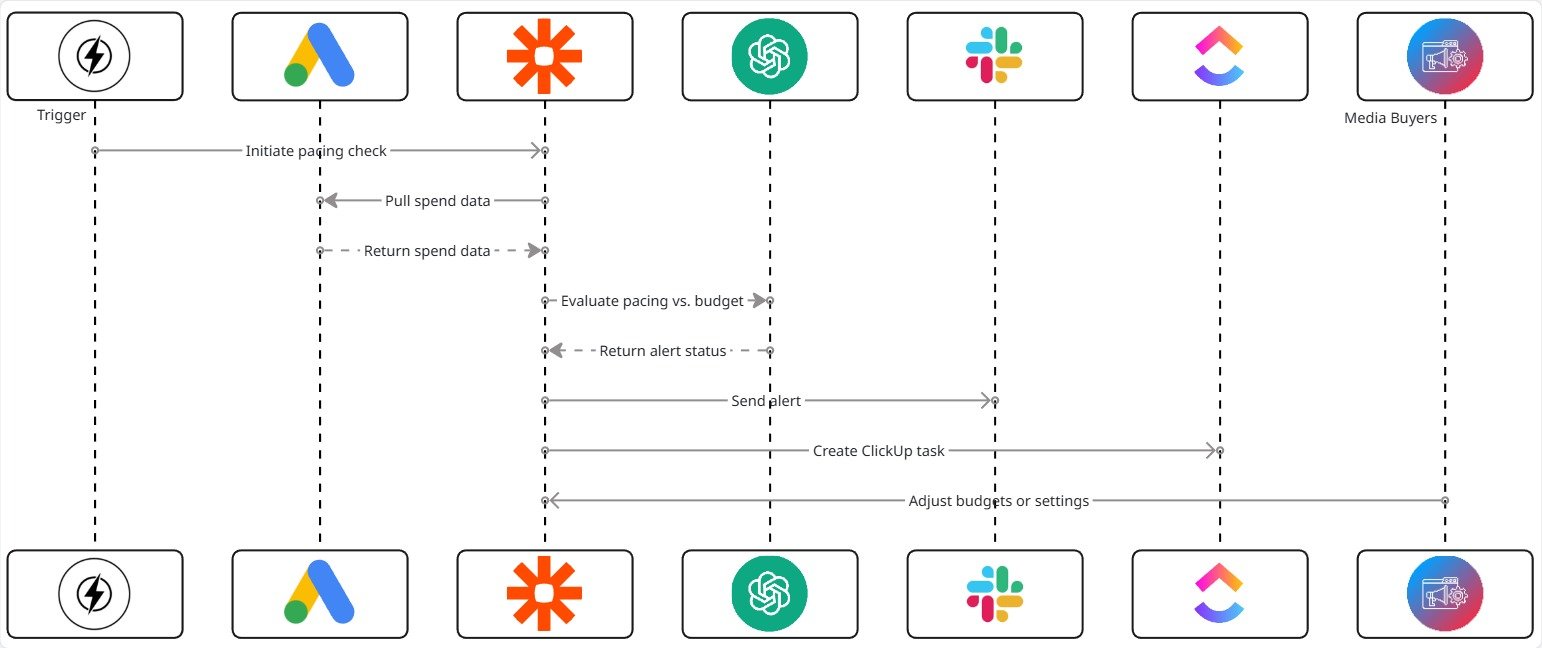
Fig. 1: Real-Time Budget Pacing Alert System for Google Ads Campaigns
6. Implementation Details
6.1 AI Prompt (The Core Logic)
The pacing system used the following structured prompt:
					Analyze Google Ads pacing data and determine whether campaigns are
overspending or underspending. Forecast end-of-month spend and classify the
issue as: Healthy, Warning, or Critical.

Data: {{pacing_data}}

Output Requirements:
- Pacing Status
- Projected month-end spend
- Deviation percentage from target budget
- Potential cause
- Recommended adjustment (up/down)
- Whether PM or media buyer action is required
The AI returns a classification plus actionable recommendations.
6.2 Score Mapping (Interpretation Rules)
Based on AI evaluation, the system applied the following classification:
| Status | Meaning | Behavior |
|---|---|---|
| Healthy | Within ±10% of pacing target | No alert needed |
| Warning | 10–25% over/under pacing | Slack soft alert |
| Critical | 25%+ deviation | Immediate Slack alert + ClickUp task |
This ensured alerts were meaningful and not noisy.
6.3 ClickUp Automations
ClickUp handled follow-up tasks using rules such as:
					If Status = Critical → Create urgent ClickUp task for buyer
If Status = Warning → Create review task for PM
If pacing returns to normal → Auto-close previous alert tasks
If multiple critical alerts in 7 days → Escalate to senior strategist
This standardized corrective action across teams.
6.4 Data Extracted for AI Analysis
The system evaluated:
◉ Daily spend
◉ Month-to-date spend
◉ Month-end forecast
◉ Budget allocation per campaign
◉ Spend velocity (past 3–7 days)
◉ Performance indicators (ROAS, CPA, CPC)
◉ Campaign status changes
◉ Day-of-week spend patterns
This enabled AI to forecast pacing and detect anomalies accurately.
7. Code-to-Business Breakdown
| Logic / Code | Business Impact |
|---|---|
| Spend vs. budget comparison | Prevents overspend before it happens |
| Trend forecasting | Predicts pacing issues days in advance |
| Severity classification | Eliminates false alarms |
| Slack notifications | Improves team reaction speed |
| Auto task creation | Ensures actionable steps are taken |
| Deviation calculation | Helps optimize daily and weekly budgets |
8. Results & Performance Impact
1. Time Saved
◉ Media buyers saved 1–2 hours daily from manual spend checks
◉ PM no longer needed to monitor pacing across accounts
2. Budget Efficiency Improved
◉ Overspending incidents dropped by 70%
◉ Underspending was corrected more quickly
◉ Campaigns landed closer to monthly budget targets
3. Team Alignment
◉ Alerts delivered instantly across Slack channels
◉ Buyers responded quicker and with clearer context
◉ Pacing became predictable across all accounts
4. Scalability
The system supported unlimited accounts with no additional workload.
Adding new accounts simply required connecting API access.
9. Challenges & How They Were Solved
Challenge: Campaigns with irregular daily spend caused false alarms
Solution: Added smoothing logic using 7-day spend velocity
Challenge: API data sometimes lagged or failed during high-volume days
Solution: Added fallback data sourcing and retry logic
Challenge: Forecasting accuracy varied across industries
Solution: Incorporated industry-specific thresholds and benchmarks
10. Lessons for Project Managers
◉ Budget pacing is one of the highest-impact workflows to automate
◉ Real-time visibility prevents costly oversights
◉ Forecasting improves decision-making more than raw data alone
◉ Automations scale client capacity without additional staff
◉ PMs become proactive rather than reactive in budget management
11. Conclusion
By integrating AI evaluation with Google Ads spend monitoring and Slack-based alerting, the PM and media team gained a real-time budget pacing system. The automation eliminated manual checks, reduced overspending risks, improved monthly delivery accuracy, and increased operational efficiency across all paid media accounts.
This system represents a major shift from reactive budget monitoring to proactive, automated control—allowing the team to stay ahead of pacing issues and protect client budgets at scale.
Want Real-Time Alerts That Protect Your Google Ads Budget Automatically?