

1. Overview
UTM tracking is the foundation of accurate performance reporting. Yet, missing or incorrectly structured UTMs remain one of the most common—and costly—errors in paid media execution. When campaigns launch without proper tracking, attribution breaks, reports become unreliable, and PMs are left explaining data gaps to clients.
To eliminate this risk, I built The UTM Guardian—an automated pre-launch validation system that checks every ad, final URL, and destination page for missing UTMs, incorrect parameters, and structural inconsistencies before campaigns go live.
This system prevents reporting failures, protects analytics hygiene, and ensures agencies never launch campaigns blind.
2. Background & Context
The agency regularly launched campaigns across:
◉ Google Ads (Search, Display, Performance Max)
◉ Meta Ads (Traffic, Lead Gen, Conversion)
◉ Multi-platform funnels feeding GA4, CRM, and dashboards
◉ Client-specific UTM naming conventions
Before automation, UTM setup relied on:
◉ Manual checks by media buyers
◉ Copy-paste from old templates
◉ Last-minute reviews before launch
◉ Assumptions that “tracking is probably fine”
As campaign volume increased, tracking errors became inevitable.
3. Problem Statement
The team faced recurring issues:
1. Campaigns launched with missing UTMs
2. UTMs present but incorrectly structured
3. Inconsistent parameter naming across platforms
4. Broken attribution in GA4 and dashboards
5. PMs discovering issues after spend had already occurred
Once a campaign is live without proper UTMs, the data loss is permanent.
The goal was to detect and stop tracking issues before launch, not after damage was done.
4. Tools & Automation Stack
Tech stack & tools used:
◉ Google Ads API / Meta Ads API
◉ URL parsing & validation logic
◉ OpenAI API (contextual error explanation)
◉ Make.com / Zapier (workflow orchestration)
◉ Google Sheets (validation logs + audit trail)
◉ Slack (real-time alerts to PMs)
◉ ClickUp (optional: block-launch or task creation)
5. Automation Flow
The UTM Guardian follows this flow:
1. Campaign or ad marked as “Ready for Launch”
2. Automation pulls all ads and final URLs
3. System parses URLs and extracts UTM parameters
4. Validation rules check for:
◉ Presence
◉ Correct structure
◉ Naming consistency
5. Errors are classified by severity
6. AI generates a clear issue summary
7. PM receives a formatted validation report
8. Campaign is approved or blocked based on results
No campaign launches without passing this check.
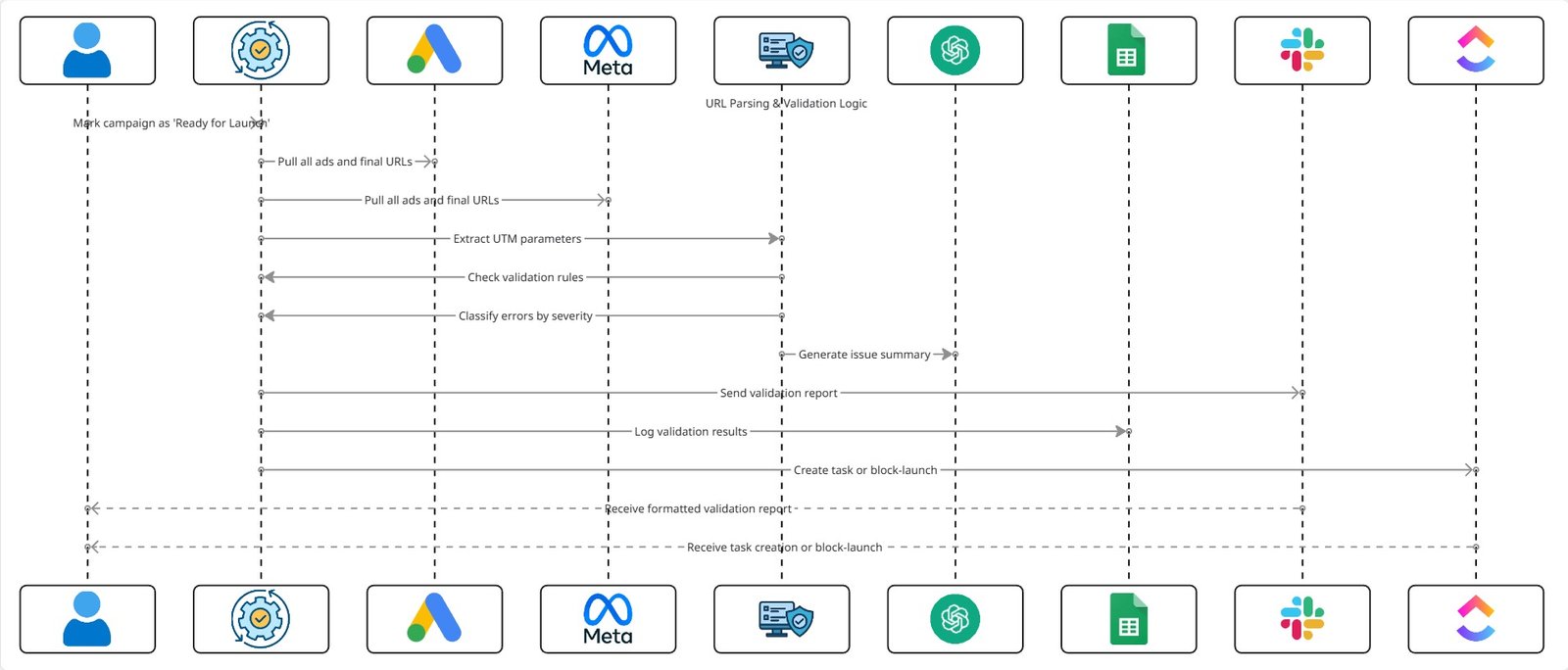
Fig. 1: Automated Pre-Launch UTM Validation and Campaign Approval Workflow
6. Implementation Details
6.1 UTM Validation Coverage
Each URL is checked for:
◉ Presence of required parameters (utm_source, utm_medium, utm_campaign)
◉ Platform-specific rules (Google vs Meta)
◉ Naming convention consistency
◉ Lowercase enforcement
◉ No spaces or illegal characters
◉ Correct delimiter usage (?, &, =)
◉ Duplicate or conflicting parameters
◉ Final URL vs tracking template mismatches
This ensured both existence and correctness, not just presence.
6.2 Rule-Based Validation Logic
Example rules applied:
◉ Missing utm_source → Critical error
◉ utm_campaign empty or generic → Warning
◉ Mixed casing or spaces → Warning
◉ Wrong medium for platform → Critical error
◉ Duplicate parameters → Critical error
Each rule produced a severity label and fixed hint.
6.3 AI Prompt (Error Explanation Layer)
AI was used to translate technical issues into PM-friendly explanations.
					You are a tracking and analytics specialist.

Given the following URL validation errors:
- Error type
- Affected ad or campaign
- Missing or incorrect parameters

Generate:
1) A short explanation of the issue
2) Why it matters for reporting
3) The exact fix required

Keep it concise and actionable.
Avoid technical jargon unless necessary.
This removed back-and-forth between PMs and media buyers.
6.4 Validation Report Format
Each report followed a fixed structure:
◉ Campaign / Ad name
◉ Final URL
◉ Validation status (Pass / Warning / Fail)
◉ Detected issues
◉ Impact on reporting
◉ Required fixes
PMs could review an entire launch set in minutes.
7. Score Mapping / Classification Logic
| Status | Meaning | Action |
|---|---|---|
| Pass | All UTMs valid | Launch approved |
| Warning | Non-critical issues | Fix recommended |
| Fail | Missing / broken UTMs | Launch blocked |
This ensured tracking hygiene was enforced, not optional.
8. ClickUp Automations
When validation failed:
◉ ClickUp task created automatically
◉ Task tagged as “Tracking Blocker”
◉ Assigned to responsible media buyer
◉ Validation report attached
◉ Campaign launch paused until resolved
This embedded tracking checks directly into execution workflows.
9. Code-to-Business Breakdown
| System Component | Business Value |
|---|---|
| URL parsing + validation | Prevents silent data loss |
| Rule-based severity logic | Removes subjective judgment |
| AI explanations | Faster fixes, fewer questions |
| Pre-launch enforcement | Zero post-launch tracking surprises |
| ClickUp integration | Accountability before spend |
10. Results & Performance Impact
1. Zero Post-Launch Tracking Failures
◉ Missing UTMs caught before spend
◉ No more retroactive reporting fixes
2. Cleaner Analytics & Attribution
◉ GA4 data remained consistent
◉ Dashboards reflected true performance
3. Faster Launch Confidence
◉ PMs approved launches without manual URL checks
◉ Media buyers spent less time debugging
4. Agency Risk Reduction
◉ Fewer client escalations about “missing data”
◉ Stronger trust in reporting accuracy
11. Challenges & How They Were Solved
Challenge: Different clients used different UTM conventions
Solution: Client-specific validation profiles
Challenge: Media buyers bypassing checks
Solution: Launch approval tied to validation status
Challenge: Over-flagging minor formatting issues
Solution: Severity tiers (Warning vs Fail) instead of hard stops
12. Lessons for Project Managers
◉ Tracking validation must happen before launch, not after
◉ UTMs are an execution dependency, not a reporting afterthought
◉ Automation protects PMs from invisible failures
◉ Enforcing standards is easier than fixing broken analytics
◉ Pre-launch checks scale better than post-launch audits
13. Conclusion
The UTM Guardian transformed tracking from a fragile manual step into a reliable, automated safeguard. By validating every ad and URL before launch, the system prevented reporting failures, protected attribution accuracy, and removed one of the most common sources of analytics chaos.
For PMs and agencies managing scale, this automation ensured that every campaign launched with clean data—and stayed accountable from day one.
Looking to Replace Manual Google Ads Audits With PM-Ready Weekly Reports?