
Tanveer Hossain Rayvee

How I Turned 90 Minutes of Meetings Into Actionable Project Boards in Under 3 Minutes Using AI

1. Overview

Meetings generate critical decisions, commitments, and next steps, but much of that value is often lost after the call ends. In fast-moving marketing environments, meeting outcomes frequently require hours of manual cleanup before they become actionable—if they are captured accurately at all.

This case study documents the implementation of an AI-powered meeting-to-execution workflow that automatically converts meeting transcripts into fully structured project boards inside ClickUp. The system extracts tasks, subtasks, owners, priorities, deadlines, blockers, and dependencies—then generates execution-ready boards within minutes, without manual note-taking or follow-up documentation.

The workflow was implemented and validated inside a live marketing agency environment, OnDeemand, allowing the system to be tested under real operational pressure across client and internal meetings.

2. Background & Context

The team conducted multiple recurring and ad-hoc meetings each week across:
Client strategy calls
Internal project syncs
Performance reviews
Creative approvals
Cross-functional planning sessions

Each meeting produced 30–90 minutes of discussion and dozens of actionable tasks. Previously, the project manager manually:
Listened through the transcript or recording
Wrote summaries
Extracted action items
Created tasks and subtasks
Assigned team members
Estimated deadlines
Identified blockers or dependencies

This required 1–2 hours after every significant meeting, amounting to 10–12 hours weekly of manual meeting cleanup.

3. Problem Statement

The operation faced several inefficiencies:
1. No consistent method for extracting tasks from meetings
2. Manual meeting cleanup consumed 10–12 hours weekly
3. High risk of forgetting or misinterpreting action items
4. No unified system for converting meetings into execution-ready tasks
5. Delayed follow-ups and slow stakeholder alignment

The team needed an automated, accurate, and scalable method to convert raw meeting conversations into actionable project execution structures.

4. Tools & Automation Stack

Zoom / Google Meet (transcription source)
OpenAI API (task extraction and structuring logic)
Zapier / Make.com (automation orchestration)
ClickUp (task creation and project board generation)
Slack (notifications when meeting boards are ready)

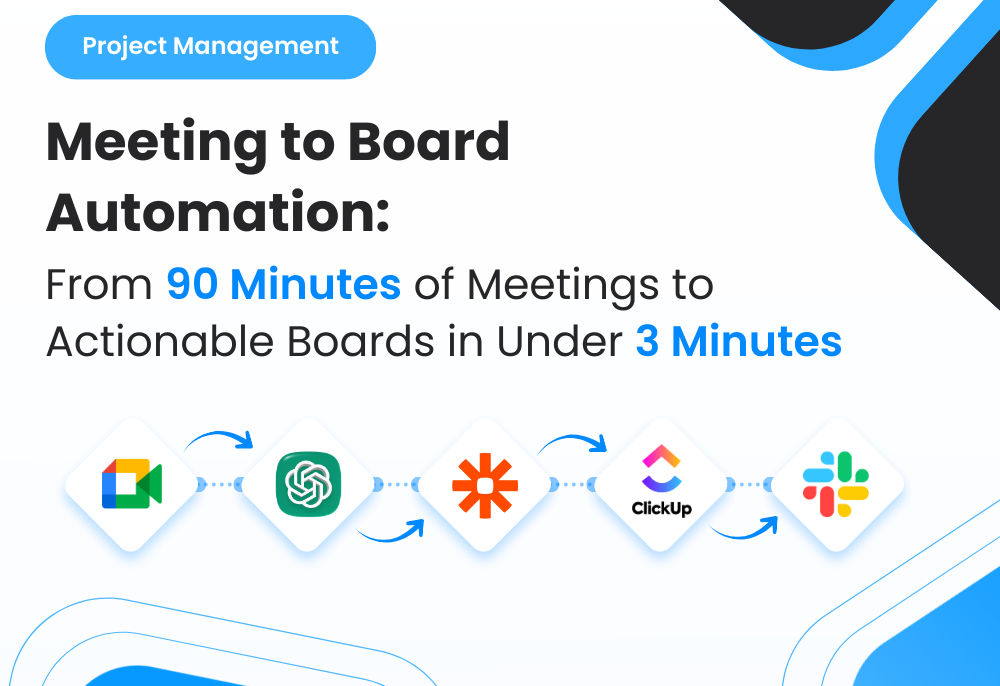
5. Automation Flow

The system followed this structure:
1. A Zoom or Meet recording finishes
2. Transcript becomes available and triggers the workflow
3. Automation fetches the full transcript
4. AI analyzes and extracts action items, owners, blockers, deadlines, dependencies
5. Clean structured task hierarchy is generated
6. ClickUp board is created with tasks and subtasks mapped
7. Slack sends the team a notification that the meeting action board is ready
This created a consistent, automated pipeline that turned every meeting into execution.
45545454

Fig. 1: AI-Powered Meeting-to-Execution Workflow for Automatic Project Board Creation

6. Implementation Details

6.1 AI Prompt (The Core Logic)

The system used the following prompt to extract structured action items:

				
					“Analyze the following meeting transcript and extract all actionable items.
For each action item, identify: task name, detailed description, owner/assignee,
priority (low/medium/high), due date (if mentioned), blockers, dependencies, and next steps.

Transcript: {{full_transcript}}

Output Requirements:
- Provide a structured JSON list of tasks.
- Each task must include:
  - title
  - description
  - assignee
  - due_date
  - priority
  - blockers
  - dependencies
  - subtasks (if mentioned)
Only output clean JSON without commentary.”


The AI returns clean, structured task data ready for automation.

6.2 Score Mapping (Interpretation Rules)

Although this workflow didn’t score tasks numerically, it used a classification system similar in intent:

CategoryMeaningBehavior
High PriorityTime-sensitive or crucial tasksMarked as “High” in ClickUp
Medium PriorityNormal tasksStandard workflow placement
Low PriorityNon-urgent tasksMoved to backlog or future sprint
Blockers IdentifiedDependencies or issuesHighlighted for escalation

This ensured all tasks entered ClickUp with clear priority and context.

6.3 ClickUp Automations

To ensure structured boards, the following rules were applied within ClickUp:

				
					If task contains blockers → Tag as “Blocked”
If priority = High → Add to “Immediate Action” List
If task includes dependencies → Link tasks automatically
If due date is missing → Assign default follow-up for PM review
If assignee not specified → Assign to project manager for routing


This kept the project board meticulously organized without human intervention.

6.4 Data Extracted for AI Processing

The system evaluated:
Speaker-specific dialogue
Explicit action statements
Deadlines mentioned verbally
Owner names (e.g., “John will handle this”)
Blockers expressed during discussion
Dependencies (“We need X before Y”)
Subtasks (“First do A, then B”)
Risks or concerns raised

This ensured a complete, accurate mapping of meeting content into a project board.

7. Code-to-Business Breakdown

Logic / CodeBusiness Impact
Transcript ingestionEliminates manual note-taking
JSON task extractionConverts conversations into immediate execution items
Priority taggingEnsures urgent items rise to visibility
Blocker detectionAccelerates problem-solving and escalation
Auto task creationRemoves administrative burden
Slack notificationsSpeeds up team awareness and execution

8. Results & Performance Impact

1. Time Saved

PM saved 10–12 hours weekly by eliminating manual meeting cleanup
Teams acted on meeting outputs immediately, without waiting for notes

2. Execution Speed Improved

Action items identified within minutes of meeting end
More accurate follow-up tasks compared to manual notes
Reduced delays caused by missing or forgotten tasks

3. Team Alignment

Everyone reviewed the same structured task board
Clear ownership and deadlines improved accountability
No more misinterpretation or unclear next steps

4. Scalability

Worked across all meetings: internal, client, strategic, creative
No additional setup required per meeting
Standardized the agency’s entire meeting-to-execution workflow

9. Challenges & How They Were Solved

Challenge: AI struggled with overlapping conversations
Solution: Pre-processed transcripts to separate speakers cleanly

Challenge: Ambiguous owner names in transcripts
Solution: Added a mapping dictionary (e.g., “Mike” = “Michael D.”)

Challenge: Too many tasks generated from long meetings
Solution: Added relevance filtering and topic clustering

10. Lessons for Project Managers

Meetings produce invaluable execution data when properly structured
AI-driven extraction removes the burden of manual note cleanup
Automated boards increase accountability and reduce missed actions
Consistent workflows strengthen cross-team communication
When meeting outcomes become instantly actionable, project velocity increases significantly

11. Conclusion

By integrating transcription analysis with AI task extraction and ClickUp automations, I transformed every meeting into a fully organized project board ready for execution.
The system removed hours of administrative work, ensured no action item was overlooked, and improved clarity and follow-through across all teams.

This case study demonstrates how AI and workflow automation can significantly improve operational efficiency and convert meetings from passive discussions into active execution engines.

Ready to Automate Your Meeting Notes and Turn Every Call Into an Execution-Ready Project Board?

Profile Picture
I'm Available for New Projects!
Availability: Maximum 2 Projects
Hire me