

1. Overview
Quarterly planning is one of the most time-intensive responsibilities for project managers. Gathering inputs, reviewing backlog items, evaluating priorities, and shaping a roadmap requires hours of sorting, filtering, and interpreting tasks across multiple teams. The process often becomes inconsistent and highly dependent on manual judgment, leading to planning delays and misaligned priorities across departments.
To streamline this, I built an AI-powered roadmap generation system that analyzes ClickUp tasks, evaluates them using custom tag-based logic, and produces structured quarterly plans automatically. The system extracts priorities, deadlines, dependencies, team workloads, and business impact—then generates a clean, organized roadmap with minimal PM intervention. This eliminated the bulk of manual roadmap creation work and significantly improved planning accuracy and consistency across teams.
2. Background & Context
3. Problem Statement
4. Tools & Automation Stack
◉ ClickUp (backlog tasks, custom tags, task metadata)
◉ OpenAI API (roadmap analysis + prioritization logic)
◉ Zapier / Make.com (automation workflow)
◉ Slack (delivery of roadmap summary)
5. Automation Flow
1. PM triggers the roadmap generator at quarter-start
2. Automation extracts all ClickUp tasks tagged for roadmap consideration
3. AI analyzes tasks using tag logic and scoring criteria
4. AI generates a structured quarterly roadmap with task groups
5. ClickUp creates a new quarterly folder with tasks organized by priority and team
6. Slack sends the completed roadmap summary to stakeholders
This created a reliable, automated pipeline that transformed backlog items into clear quarterly plans.
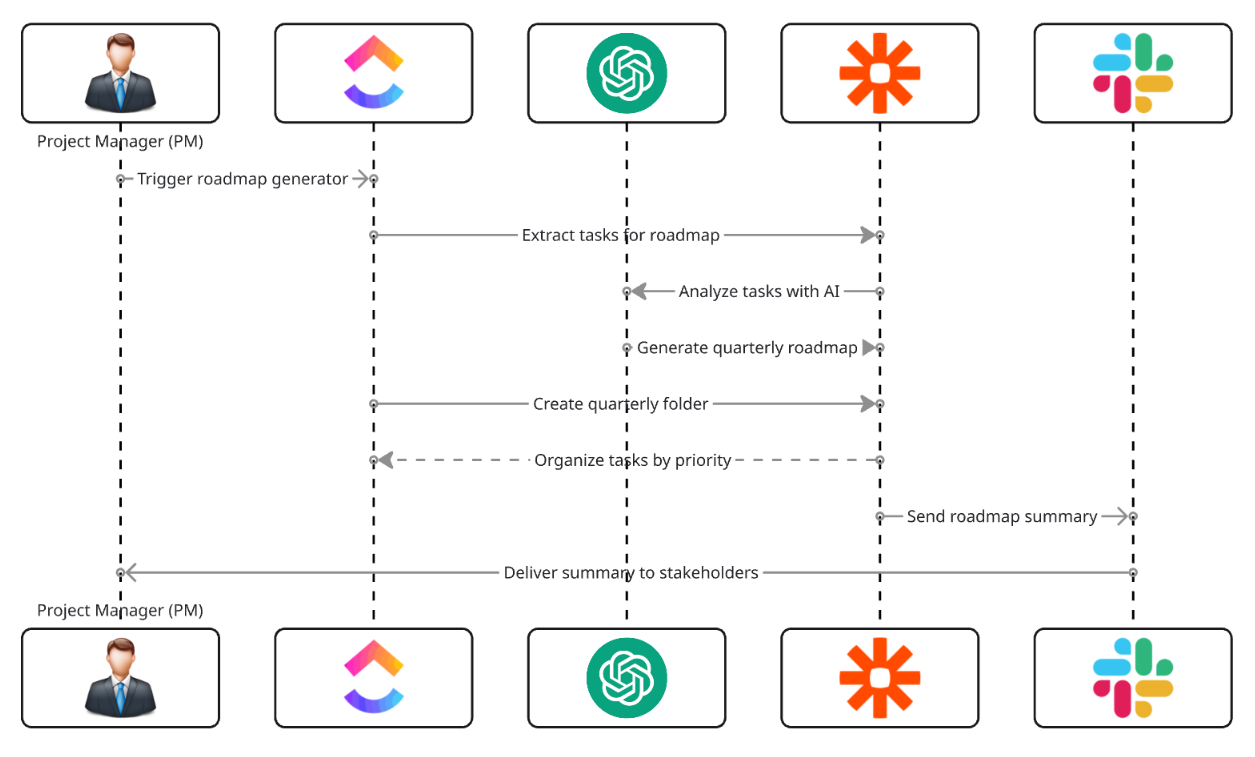
Fig. 1: AI-Powered Quarterly Roadmap Generation from ClickUp Backlog Tasks
6. Implementation Details
6.1 AI Prompt (The Core Logic)
The following prompt powered roadmap generation:
					“Analyze the following ClickUp tasks and generate a quarterly roadmap.
For each task, evaluate: impact, complexity, urgency, team, tags, estimated time,
dependencies, and deadlines. Group tasks into Q1 roadmap sections:
High Priority, Medium Priority, Low Priority.

Tasks: {{task_list}}

Output Requirements:
- Roadmap title for the quarter
- Three priority buckets with tasks:
  - title
  - description
  - assignee
  - priority
  - estimated completion window
  - dependencies
- Provide a summary of overall workload and risks.”
The AI outputs a structured roadmap ready for import.
6.2 Score Mapping (Interpretation Rules)
Tags and metadata guided the roadmap classification:
| Tag / Factor | Meaning | Behavior |
|---|---|---|
| high-impact | Direct business or revenue value | Put in High Priority |
| complex | Requires multi-team collaboration | Mark dependencies |
| quick-win | Low effort, high value | Add to Medium Priority |
| blocked | Depends on external factors | Schedule tentatively |
| strategic | Long-term initiatives | Place early for visibility |
6.3 ClickUp Automations
The ClickUp workspace applied the following rules:
					If task tagged "high-impact" → Move to High Priority list
If task includes dependencies → Add "Dependencies" tag
If task contains "quick-win" → Move to Medium Priority list
If task marked "blocked" → Add to roadmap with status "Pending"
If new roadmap folder created → Auto-assign department leads
This standardized roadmap creation across teams.
6.4 Data Extracted for AI Analysis
The system evaluated:
◉ ClickUp tags (high-impact, quick-win, complex, etc.)
◉ Task descriptions & objectives
◉ Estimated hours or points
◉ Dependencies and blockers
◉ Deadlines or requested timing
◉ Assignee and team
◉ Department workload distribution
This ensured the roadmap was aligned with capacity and business goals.
7. Code-to-Business Breakdown
| Logic / Code | Business Impact |
|---|---|
| Tag-driven filtering | Ensures roadmap only includes relevant tasks |
| Priority scoring | Creates objective, data-driven roadmaps |
| Dependency detection | Prevents mis-sequencing and delays |
| AI grouping | Automatically builds a clean roadmap structure |
| Auto-folder creation | Standardizes quarterly processes |
| Slack summary | Improves visibility and stakeholder alignment |
8. Results & Performance Impact
1. Time Saved
◉ PM saved 12–14 hours each quarter normally spent building roadmaps
◉ Stakeholder alignment accelerated because roadmaps were standardized
2. Planning Accuracy Improved
◉ Dependencies surfaced automatically, reducing planning errors
◉ High-impact tasks consistently rose to the top
◉ Roadmaps became more predictable and structured
3. Team Alignment
◉ All departments followed the same prioritization model
◉ Quarterly expectations became clearer
◉ PM no longer needed to manually reorganize roadmap sections
4. Scalability
The system worked across multiple departments and client teams without customization. Each quarter, PMs generated new roadmaps with a single trigger.
9. Challenges & How They Were Solved
Challenge: Some tasks had unclear or inconsistent tag usage
Solution: Implemented a tagging standard and periodic tag audits
Challenge: AI occasionally miscategorized long-term projects
Solution: Refined prompts using examples of strategic tasks
Challenge: Roadmaps became too large if tags were used overly broadly
Solution: Added filtering to exclude low-value or outdated tasks
10. Lessons for Project Managers
◉ Tagging consistency is critical for automation accuracy
◉ AI works best when metadata is structured and reliable
◉ Automating quarterly planning eliminates administrative overhead
◉ Standardized roadmaps improve communication across teams
◉ Investing time in tagging hygiene yields significant downstream efficiency
11. Conclusion
By combining AI analysis with ClickUp tag logic, quarterly planning became a streamlined, automated workflow. The system transformed a previously manual and error-prone process into a predictable, objective, and scalable roadmap production engine. This automation empowered the PM to focus on strategic initiatives instead of administrative labor and ensured each quarter began with clarity, alignment, and prioritized execution.
Looking to Automate Your Entire Quarterly Planning Process With One Click?