

From Hours of Manual Reporting to Automated Daily Slack Dashboards:
How a Canadian Clinic Streamlined PPC Campaign Tracking
Background
A private healthcare clinic in Canada, with four different locations, runs daily PPC campaigns to attract new patients. As an agency managing their account, we traditionally created monthly reports but the client wanted daily updates to track ongoing performance.
This meant:
- ◉ Pulling data from Google Ads
- ◉ Sending email updates or Slack summaries
- ◉ Preparing metrics like cost, clicks, CPC, conversions, and calls
Manually, this process took 20 minutes per client, per day.
Over a month, that’s easily 10+ hours of repetitive reporting work, not including the risk of manual errors.
Problem Statement
- ◉ Daily Client Demand: Even though monthly reports were the standard, the client wanted daily insights.
- ◉ Limited Metrics, Quick View: Focus only on Spend, Clicks, Avg CPC, Conversions, and Calls — just enough to understand daily performance.
- ◉ Day-to-Day Comparison: Client wanted to see whether results were improving or declining compared to the previous day.
- ◉ Communication Flow: Sending email reports cluttered inboxes. Discussions around performance became scattered.
- ◉ Agency Resource Drain: Repetitive reporting consumed analyst time that could be better used for optimization.
- ◉ Cost Considerations: Tools like Zapier or Make.com could automate this, but they come with subscription costs per client. For an agency with multiple clients, this cost scales heavily.
Connecting Google Ads Script to Slack
To automate daily reporting, we first needed a communication bridge between Google Ads and Slack. The easiest, most secure, and cost-free way to do this was by using Slack Incoming Webhooks.
Step-by-Step Implementation
- ◉ Enable Incoming Webhooks in Slack
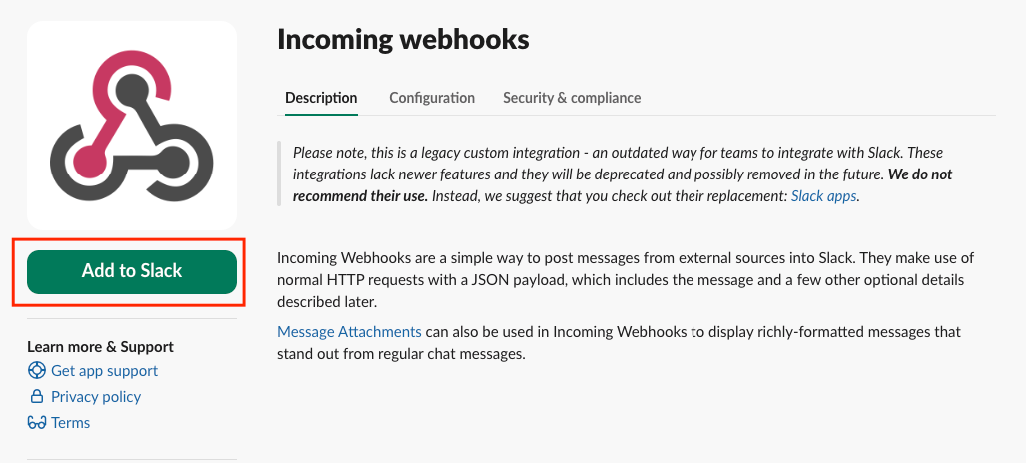
- From the Slack App Directory, select Incoming Webhooks.
- Click Add to Slack.
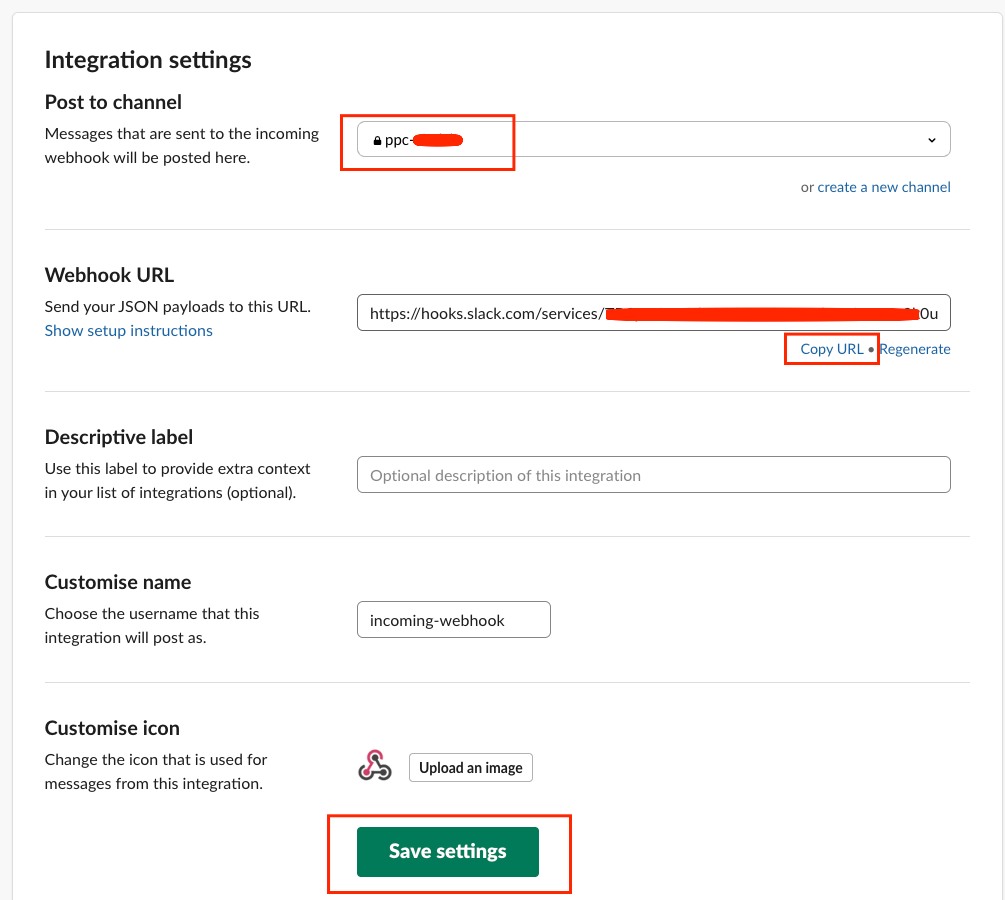
- ◉ Choose Target Channel
- Decide where the reports should be posted:
- Internal team channel (for monitoring)
- Client-facing channel (for direct visibility)
- In this case, we created a dedicated PPC channel where daily performance updates would be delivered.
- ◉ Generate Webhook URL
- Once the channel is selected, Slack automatically generates a unique Webhook URL.
- This URL acts as the destination for all automated messages.
- (Example: https://hooks.slack.com/services/…)
- ◉ Save & Configure
- We customized the name (e.g., incoming-webhook) and icon for branding consistency.
- Saved the integration to finalize the connection.
- ◉ Integrate Webhook into Google Ads Script
- Inside Google Ads Script, we added the Webhook URL:
const SLACK_WEBHOOK_URL = 'https://hooks.slack.com/services/...'; - Every time the script runs, it collects campaign data → formats it → sends it as JSON payload to this URL.
- Slack then publishes the data neatly into the selected channel.
- Inside Google Ads Script, we added the Webhook URL:
Key Takeaways


Solution Implemented
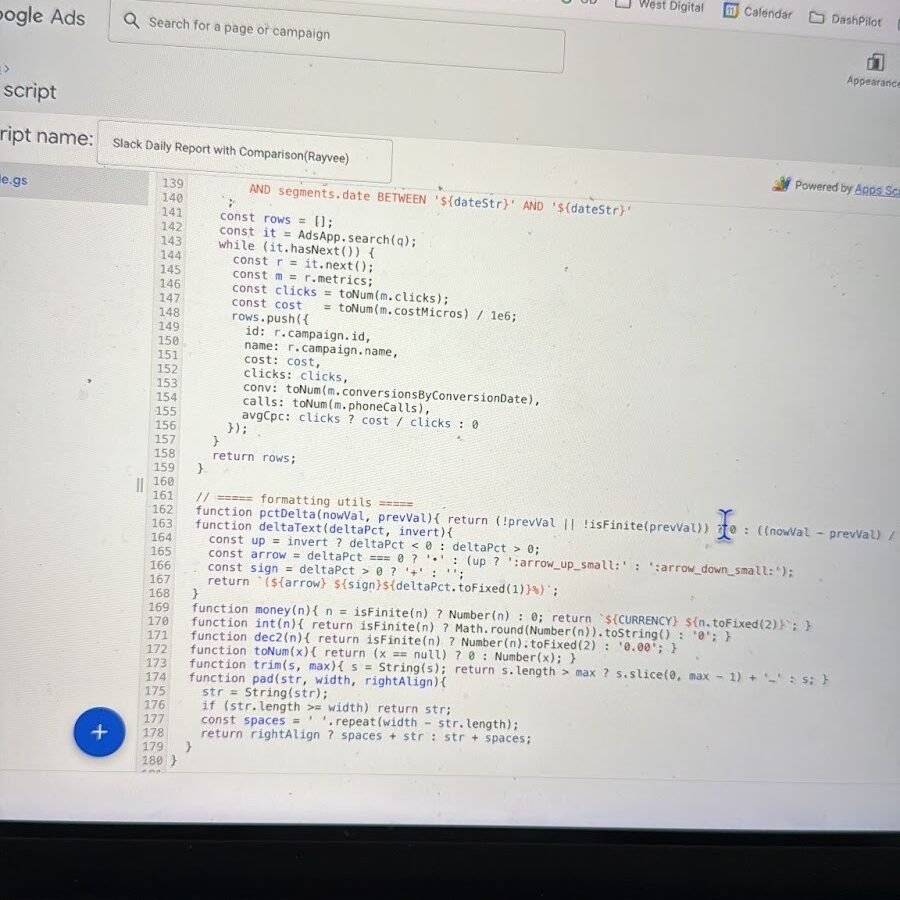
We designed a Google Ads Script that:
- ◉ Extracts campaign-level metrics (Spend, Clicks, CPC, Conversions, Calls).
- ◉ Compares yesterday vs previous day performance.
- ◉ Formats the data into Slack-friendly tables + emoji indicators.
- ◉ Pushes the update directly into a chosen Slack channel every morning at 7 AM.
This way:
- ◉ Both the agency team and the client team see the data live in Slack.
- ◉ Discussions can happen in one place, and data never gets buried in emails.
- ◉ The script runs automatically, with no recurring software costs.
Code-to-Business Breakdown
| CODE SNIPPET (LEFT) | EXPLANATION (RIGHT) |
|---|---|
const SLACK_WEBHOOK_URL = 'https://hooks.slack.com/services/...'; | Slack incoming webhook. Defines the destination channel where daily reports will appear. |
const DATE_RANGE = 'YESTERDAY'; | Ensures data is always pulled for the last full day, avoiding partial results. |
metrics.cost_micros, metrics.clicks, metrics.conversions, metrics.phone_calls | Core metrics selected for reporting: Spend, Clicks, Conversions, and Calls. |
UrlFetchApp.fetch(SLACK_WEBHOOK_URL, { ... }) | Pushes the final formatted payload into Slack. This is what delivers the actual message visible to client/team. |
pctDelta(nowVal, prevVal) | Calculates % change between yesterday and previous day, enabling quick “better or worse” comparisons. |
' ' + header + '\n' + body + ' ' | Wraps campaign-level results into a neat monospace table for Slack readability. |
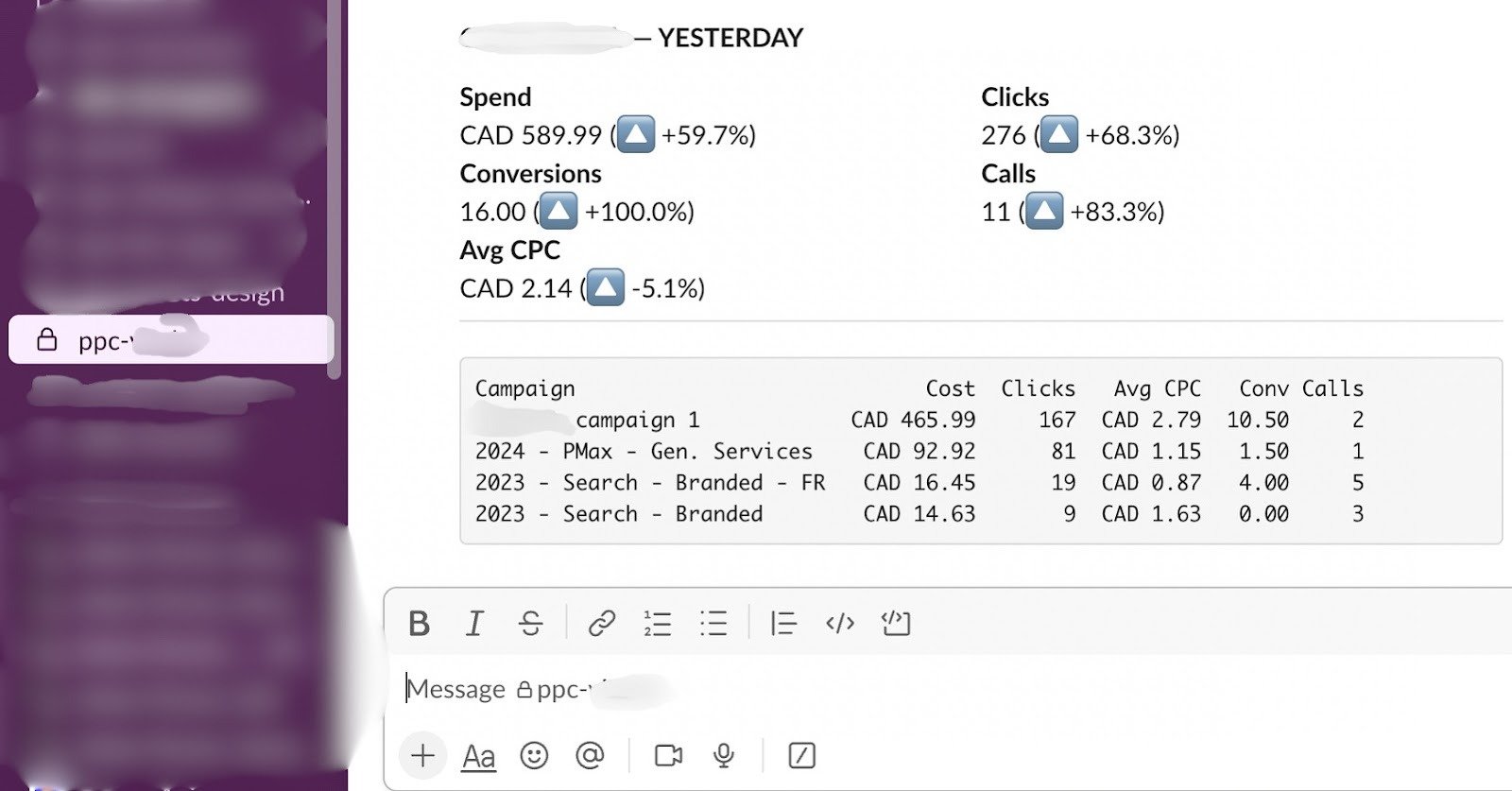
Resulting Slack Message
- ◉
Overview (Spend, Clicks, Conversions, Calls, Avg CPC) - ◉
Day-over-Day Comparison with emoji indicators 📈📉 - ◉
Campaign-level Table (aligned columns for clarity)
This transforms Slack into a live PPC reporting hub, replacing messy email chains.
Benefits
| FOR THE AGENCY | FOR THE CLIENT |
|---|---|
| Saves 20 minutes per client per day | Daily transparency into ad spend and performance |
| Removes manual errors in reporting | Clear understanding of campaign effectiveness |
| Standardized reporting format for all clients | Instant discussions in Slack channels (no inbox overload) |
| Zero cost — no Zapier, no Make.com subscription fees | Easy to spot trends with comparisons |
Challenges Faced & How We Solved Them
- ◉ GAQL Query Errors (e.g., invalid DURING operators, prohibited metrics like phone_calls)
- Fixed by restructuring queries and using only supported fields.
- ◉ Formatting Misalignments in Slack Tables
- Solved with custom padding functions (
pad()) ensuring cost/clicks align neatly.
- Solved with custom padding functions (
- ◉ Date Range Issues (LAST_2_DAYS vs explicit YYYY–MM–DD)
- Resolved by dynamically generating yesterday’s and previous day’s dates.
- ◉ Webhook Setup Errors
- Addressed by reconfiguring Slack app and replacing old deprecated webhooks.
Future Scope
- ◉ Expand metrics (CTR, ROAS, CPA) only when needed.
- ◉ Build multi-account rollups (agency dashboard).
- ◉ Add Google Sheets sync for archival.
- ◉ Enhance Slack formatting with blocks & charts (visual mini-reports).
Summary
- ◉ Automated Slack reporting saves time, money, and errors.
- ◉ Focused on 5 key metrics for clarity and speed.
- ◉ Provides day-over-day performance comparisons.
- ◉ Eliminates the need for paid automation tools.
- ◉ Creates a shared discussion space with client teams.
Want Your PPC Performance Delivered to Slack Automatically Every Day?